Display e comandi vocali
Visualizzazione dei dati di viaggio sul quadro strumenti
In questo manuale: Display e comandi vocali
3passaggi
~18min
2/5difficoltà
Completati 0 di 3
Data recorded and calculated by the trip computer can be displayed on the instrument panel.
Questi dati sono memorizzati nell'app Computer di bordo. È possibile scegliere quali informazioni visualizzare sul quadro strumenti nel menu dell'app.
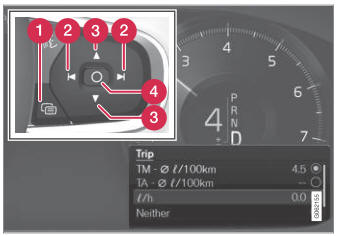
Open and navigate in the app menu1 using the righthand steering wheel keypad.
 App menu
 Left/right
 Up/down
 Confirm
- Open the app menu in the instrument panel by pressing (1).
(The App menu cannot be opened while there is an unacknowledged message in the instrument panel. The message must be acknowledged by pressing the O button (4) before the App menu can be opened).
- Navigate to the trip computer app by mov- ing left or right using (2).
- Le prime quattro righe del menu mostrano i valori misurati per il contachilometri parziale TM. Le successive quattro righe mostrano i valori per il contachilometri parziale TA. Scorrere verso l'alto o verso il basso nell'elenco utilizzando (3).
- Scroll down to the option buttons to choose which information to show in the instrument panel:
- Contachilometri
- Autonomia residua
- Trip (tachimetro alternativo)
- Distanza per Trip TM, TA o nessuna distanza
- Current fuel consumption, average fuel consumption for TM or TA, or no display of fuel consumption
Select or clear a selection using the O button (4). The change will apply immediately.
1 The illustration is generic - details may vary according to vehicle model.
Mettiti alla prova
Un breve quiz sulla Volvo XC90: ogni risposta ha una spiegazione e un link alla pagina del manuale.
Questa pagina ti è stata utile?