Gestione dei messaggi sul quadro strumenti
Messages in the instrument panel are controlled using the right-side steering wheel keypad.
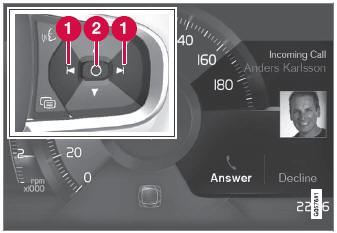
Examples of messages in the instrument panel1 and the right-side steering wheel keypad.
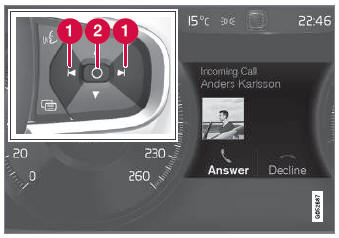
Examples of messages in the instrument panel2 and the right-side steering wheel keypad. The illustration is generic - details may vary according to vehicle model.
 Left/right
 Confirm
Alcuni messaggi sul quadro strumenti contengono uno o più pulsanti per, ad esempio, confermare il messaggio o accettare una richiesta.
Gestione dei nuovi messaggi
Per i messaggi con pulsanti:
- Spostarsi tra i pulsanti premendo a sinistra o a destra (1).
- Confirm your selection by pressing confirm (2).
- Il messaggio scompare dal quadro strumenti.
Per i messaggi senza pulsanti:
- Close the message by pressing confirm (2) or let the message automatically timeout after a short period.
- Il messaggio scompare dal quadro strumenti.
I messaggi che devono essere salvati vengono memorizzati nell'app Stato vettura, che può essere aperta dalla vista App sul display centrale. Il messaggio Messaggio del veicolo memorizzato nell'app Stato vettura comparirà contemporaneamente sul display centrale.
1 With 8" instrument panel.
2 With 12" instrument panel.
Mettiti alla prova
Un breve quiz sulla Volvo XC90: ogni risposta ha una spiegazione e un link alla pagina del manuale.