Дисплей и голосовой контроль
Обработка сообщений, сохраненных с центрального дисплея
Место в руководстве: Дисплей и голосовой контроль
2шагов
~12мин
1/5сложность
Выполнено 0 из 2
Messages saved from the instrument panel and center displays are handled in the center display.
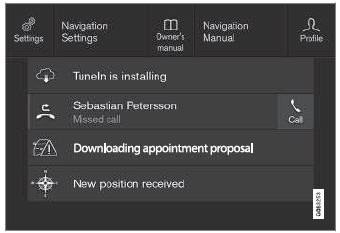
Примеры сохраненных сообщений и возможных выборов вверху.
Messages that have been shown in the center display and that need to be saved are stored in the center display's Top view.
Чтение сохраненных сообщений
- Open Top view in the center display.
- Список сохраненных сообщений будет отображаться. Messages with an arrow to the right can be expanded.
- Tap a message to expand/minimize it.
- More information about the message will appear in the list and the image to the left of the app will display information about the message in graphic form.
Обработка сохраненных сообщений
Некоторые сообщения имеют кнопку, например, activate/ deactivate a function related to the message.
- Нажмите кнопку, чтобы выполнить действие.
Saved messages in Top view are automatically deleted when the ignition is switched off.
Проверьте себя
Короткий тест по Volvo XC90: после ответа — пояснение и ссылка на страницу руководства.
Страница помогла?