Écran et commandes vocales
Gestion des messages enregistrés depuis l'écran central
Dans ce manuel : Écran et commandes vocales
2étapes
~12min
1/5difficulté
Fait 0 sur 2
Messages saved from the instrument panel and center displays are handled in the center display.
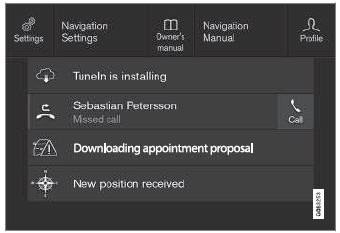
Exemples de messages enregistrés et de choix possibles en haut de l'écran.
Messages that have been shown in the center display and that need to be saved are stored in the center display's Top view.
Lecture des messages enregistrés
- Open Top view in the center display.
- La liste des messages enregistrés s'affiche. Les messages comportant une flèche vers la droite peuvent être développés.
- Tap a message to expand/minimize it.
- More information about the message will appear in the list and the image to the left of the app will display information about the message in graphic form.
Traitement des messages enregistrés
Certains messages comportent un bouton permettant, par exemple, d'activer/désactiver une fonction liée au message.
- Appuyez sur le bouton pour effectuer l'action.
Saved messages in Top view are automatically deleted when the ignition is switched off.
Testez-vous
Un quiz rapide sur Volvo XC90 : chaque réponse est expliquée, avec un lien vers la page du manuel.
Cette page vous a-t-elle été utile ?