Pantalla y control por voz
Gestión de mensajes guardados en la pantalla central
En este manual: Pantalla y control por voz
2pasos
~12min
1/5dificultad
Hecho 0 de 2
Messages saved from the instrument panel and center displays are handled in the center display.
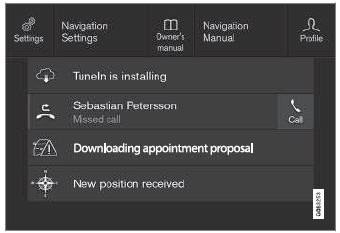
Ejemplos de mensajes guardados y de las posibles opciones en la parte superior.
Messages that have been shown in the center display and that need to be saved are stored in the center display's Top view.
Lectura de mensajes guardados
- Open Top view in the center display.
- Se mostrará la lista de mensajes guardados. Los mensajes con una flecha a la derecha pueden expandirse.
- Tap a message to expand/minimize it.
- More information about the message will appear in the list and the image to the left of the app will display information about the message in graphic form.
Gestión de mensajes guardados
Algunos mensajes tienen un botón, por ejemplo, para activar o desactivar una función relacionada con el mensaje.
- Pulse el botón para realizar la acción.
Saved messages in Top view are automatically deleted when the ignition is switched off.
Pon a prueba tus conocimientos
Un test rápido sobre el Volvo XC90: cada respuesta trae una explicación y un enlace a la página del manual.
¿Le resultó útil esta página?