Lane departure warning
The lane departure warning in the BMW 5 VII generation warns the driver if the vehicle leaves the lane unintentionally. A front camera monitors the position of the vehicle between the lane markings. If the vehicle is detected leaving the lane without the turn signal being set, a steering wheel vibration is issued as a warning. The sensitivity and warning timing can be individually adjusted via the iDrive system. Especially on long motorway journeys or when driving is monotonous, the system helps increase attention and avoid accidents. A useful addition to active driving safety, day and night.
Principle
The lane departure warning alerts you when the vehicle is about to leave the lane on roads with lane boundary lines.
General
This camera-based system issues warnings above a minimum speed.
The minimum speed depends on the country and is shown in the menu for the Intelligent Safety systems.
The steering wheel begins to vibrate slightly during warnings. The timing of the warning may vary depending on the current driving situation.
The system does not warn if the turn signal is activated before leaving the lane.
Vehicles with side collision warning: If a lane boundary line is crossed in the speed range up to 210 km/h, the system additionally intervenes with a brief active steering input, in addition to the vibration, and helps keep the vehicle in its lane.
Safety information
WARNING The system does not relieve you of your own responsibility to assess the course of the road and the traffic situation. There is a risk of accident. Adapt your driving style to the traffic conditions. Watch the traffic and intervene actively in the relevant situations. Do not move the steering wheel unnecessarily forcefully when warnings are issued.
Prerequisites for operation
The lane boundary lines must be detected by the camera for the lane departure warning to be active.
Overview
Button in vehicle
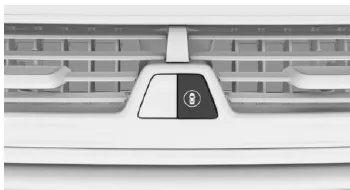
 Intelligent Safety
Camera
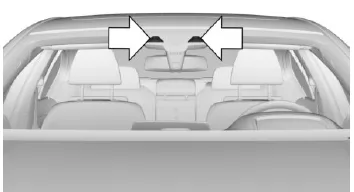
The camera is located in the area of the interior rearview mirror.
Keep the windshield in the area in front of the interior rearview mirror clean and free of obstructions.
Switching on/off
Switch on automatically
The lane departure warning activates automatically after starting the journey if the function was switched on at the end of the last journey.
Switch on/off manually
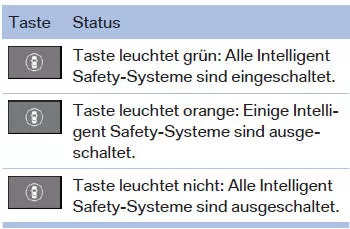
 Press the button.
The menu for the Intelligent Safety systems is displayed.
If all Intelligent Safety systems were switched off, all systems are now switched on.
"Configure INDIVIDUAL": Depending on equipment, the Intelligent Safety systems can be configured individually. The individual settings are activated and stored for the currently used driver profile.
As soon as a setting is changed in the menu, all settings in the menu are activated.
Press the button repeatedly.
Switch between the following settings: "ALL ON": All Intelligent Safety systems are switched on. Basic settings are activated for the sub-functions.
"INDIVIDUAL": The Intelligent Safety systems are switched on according to the individual settings.
Some Intelligent Safety systems cannot be switched off individually.
 Press and hold the button.
All Intelligent Safety systems are switched off.
Adjusting the sensitivity of the warnings
Via iDrive:
- "My Vehicle"
- "Vehicle settings"
- "Intelligent Safety"
- "Lane departure warn."
- Select the desired setting.
- "always": The system always warns within the technical limits.
- "reduced": Depending on the situation, some warnings are suppressed, e.g. when overtaking without indicating or when intentionally crossing lane lines in curves.
- "off": No warnings are issued.
The selected setting is saved for the driver profile currently in use.
Adjusting the strength of the steering wheel vibration via iDrive:
- "My Vehicle"
- "Vehicle settings"
- "Steering wheel vibration"
- Select the desired setting.
The setting applies to all Intelligent Safety systems and is saved for the driver profile currently in use.
Vehicles with side collision warning: switching steering intervention on/off
The steering intervention can be switched on and off separately for the lane change warning and the lane departure warning.
Via iDrive:
- "My Vehicle"
- "Vehicle settings"
- "Intelligent Safety"
- "Steering intervention"
The selected setting is saved for the driver profile currently in use.
Display in the instrument cluster
 The symbol lights up green: at least one lane marking has been detected and warnings can be issued.
Warning Function
When leaving the lane
When leaving the lane and a lane marking is detected, the steering wheel begins to vibrate.
If the turn signal is activated before changing lanes, no warning is issued.
With side collision warning
If a lane marking is crossed in the speed range up to 210 km/h, the system intervenes in addition to the vibration with a brief active steering intervention, helping to keep the vehicle in its lane. The steering intervention can be felt at the steering wheel and can be overridden manually at any time.
When towing a trailer
If the trailer socket is in use, e.g. when towing a trailer or operating a bicycle carrier, no steering intervention takes place.
Cancellation of the warning
The warning is cancelled in the following situations:
- Automatically after approx. 3 seconds.
- When returning to your own lane.
- When braking hard.
- When the turn signal is activated.
- When DSC is controlling
System limitations
Safety information
WARNING Due to system limitations, the system may respond incorrectly or not at all. There is a risk of accident or property damage. Observe the notes on system limitations and intervene actively if necessary.
Functional restrictions
The function may be restricted, for example, in the following situations:
- In heavy fog, rain or snowfall.
- With missing, worn, poorly visible, converging or diverging, or unclear lane markings, such as at construction sites.
- When lane markings are covered by snow, ice, dirt or water.
- On sharp bends or narrow roads.
- When lane markings are not white.
- When lane markings are obscured by objects.
- When driving closely behind a vehicle ahead.
- With persistent glare from backlight, e.g. low sun.
- If the camera's field of view or the windshield in the area in front of the interior mirror is dirty or obstructed.
- During the camera calibration process immediately after vehicle delivery.
If the function is restricted, a Check Control message is displayed.
Sensitivity of the warnings
The more sensitive the warnings are set, the more warnings are displayed.
As a result, unintended warnings may also occur more often.
The lane departure warning of the BMW 5 Series G30/G31 helps the driver avoid unintentionally leaving the lane. A front camera monitors the road markings, and if a lane departure is imminent, a warning is issued in the form of a vibration at the steering wheel. Depending on equipment, a steering intervention helps keep the vehicle safely in its lane.
The individually adjustable sensitivity and the integration into the driver profile make the function particularly user-friendly. The system actively contributes to safety without relieving the driver of responsibility.
This keeps the BMW 5 Series G30/G31 a pioneer of modern assistance systems that noticeably relieve the driver in everyday driving.
Test yourself
A quick BMW 5 quiz: every answer comes with an explanation and a link to the manual page.