Forward Collision Warning with braking function
The Forward Collision Warning with braking function in the BMW 5 Series G30 is a central safety system based on camera and radar sensors. It detects impending collisions with vehicles ahead or crossing vehicles and responds with visual warnings and automatic braking intervention. The system operates from approx. 5 km/h and can brake the vehicle to a standstill, being especially effective at speeds up to 80 km/h. In combination with active cruise control, control is even more precise. Even with sudden obstacles or in city traffic, the City braking function contributes to active safety. The warning stages – preliminary warning, acute warning and automatic braking intervention – are graded and have different sensitivity depending on the driving situation. Drivers can adjust the warning timing via iDrive. Limits exist in extreme weather, when facing direct glare, or with vehicle shapes that cannot be recognized. Despite state-of-the-art technology, the system does not replace personal responsibility – the driver must always intervene in case of danger.
Principle
The system can help avoid accidents.
If an accident cannot be avoided, the system helps reduce the impact speed.
The system warns of possible collision risk and brakes automatically if necessary.
General
The system is controlled by a camera.
On vehicles with radar sensor, the Forward Collision Warning is additionally controlled by the radar sensor of the cruise control.
Junction warning, on vehicles with radar sensor: Additionally, at intersections and junctions, a warning is issued when a collision risk with crossing traffic is detected.
The forward collision warning is also available when cruise control is deactivated.
When approaching a vehicle deliberately, the forward collision warning and braking intervention occur later to prevent unwarranted system reactions.
The system warns of possible collision risk with vehicles in two stages from approx. 5 km/h.
The timing of these warnings may vary depending on the current driving situation.
Switching on/off
Switch on automatically
The system is automatically active after every trip start.
Switch on/off manually
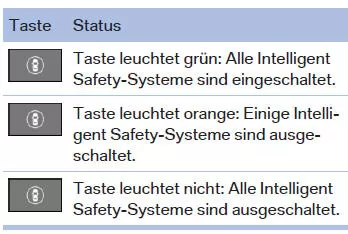
Press the button.
The menu for the Intelligent Safety systems is displayed.
If all Intelligent Safety systems were switched off, all systems are now switched on.
"Configure INDIVIDUAL": Depending on equipment, the Intelligent Safety systems can be configured individually. The individual settings are activated and stored for the currently used driver profile.
As soon as a setting is changed in the menu, all settings in the menu are activated.
Press the button repeatedly.
Switch between the following settings:
"ALL ON": All Intelligent Safety systems are switched on. Basic settings are activated for the sub-functions.
"INDIVIDUAL": The Intelligent Safety systems are switched on according to the individual settings.
Some Intelligent Safety systems cannot be switched off individually.
 Press and hold the button.
All Intelligent Safety systems are switched off.
Set warning timing
Via iDrive:
- "My Vehicle"
- "Vehicle settings"
- "Intelligent Safety"
- "Forward collision warning"
- Select the desired setting.
The selected timing is saved for the driver profile currently in use.
Detection range
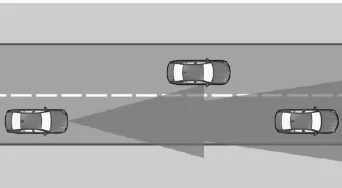
Objects detected by the system are taken into account.
Cross-traffic warning: Vehicles crossing your direction of travel can also be detected by the system as soon as these vehicles enter the detection range of the system.
Safety notes
WARNING Displays and warnings do not relieve you of your own responsibility. Due to system limits, warnings or system reactions may not be issued, may be late, or may be incorrect. There is a risk of accident. Adapt your driving style to traffic conditions. Observe traffic and actively intervene in the appropriate situations. WARNING Due to system limits, malfunctions of individual functions may occur when towing or being towed with Intelligent Safety systems activated, e.g. Forward Collision Warning with braking intervention.
Risk of accident. Before towing or being towed, switch off all Intelligent Safety systems.
Overview
Button in vehicle
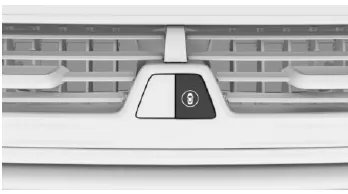
 Intelligent Safety
Camera
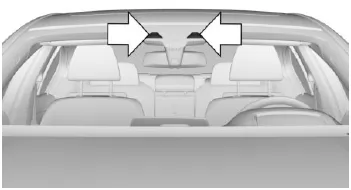
The camera is located in the area of the interior rearview mirror.
Keep the windshield in the area in front of the interior mirror clean and clear.
With Active Cruise Control: radar sensor
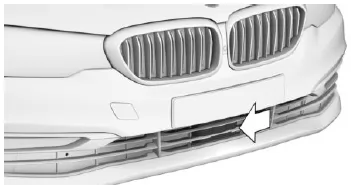
The radar sensor is located in the lower area of the front bumper.
Keep the radar sensor clean and clear.
Warning with braking function
Display
A warning symbol is displayed in the instrument cluster and on the Head-Up Display when a collision with a detected vehicle is imminent.
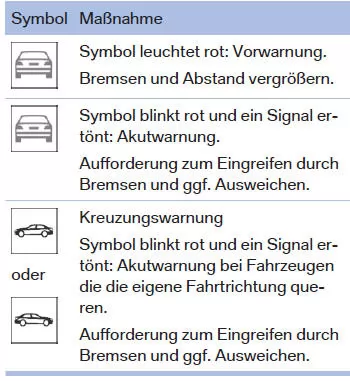
Pre-warning
A pre-warning is displayed, for example, when a collision risk is developing or when the distance to a vehicle ahead is very short.
With a pre-warning, intervene yourself.
Acute warning with braking function
An acute warning is displayed when there is an immediate collision risk, if the vehicle is approaching another object at a high differential speed.
With an acute warning, intervene yourself. In case of collision risk, the system may also assist
by applying the brakes automatically.
An acute warning can also be triggered without a preceding pre-warning.
Braking intervention, City braking function
The warning prompts you to intervene yourself.
During a warning, when the brake pedal is pressed, maximum braking force is applied.
A sufficiently fast and firm press of the brake pedal is required.
In addition, in case of collision risk the system may assist by applying the brakes automatically.
At low speed, the vehicle can be braked to a standstill.
Manual transmission: During a braking intervention down to a standstill, the engine may stall.
The braking intervention takes place up to approx. 80 km/h.
The braking intervention only takes place if driving stability has not been restricted, e.g.
by deactivating Dynamic Stability Control DSC.
The braking intervention can be cancelled by pressing the accelerator pedal or by an active steering movement.
Object detection may be limited. Observe the limits of the detection range and the functional restrictions.
With radar sensor and Active Cruise Control: braking intervention
The warning prompts you to intervene yourself.
During a warning, when the brake pedal is pressed, maximum braking force is applied.
A sufficiently fast and firm press of the brake pedal is required.
In addition, in case of collision risk the system may assist by applying the brakes automatically.
The vehicle can be braked to a standstill.
The braking intervention only takes place if driving stability has not been restricted, e.g.
by deactivating Dynamic Stability Control DSC.
Above approx. 210 km/h, the braking intervention takes the form of a brief brake jolt. No automatic deceleration takes place.
The braking intervention can be cancelled by pressing the accelerator pedal or by an active steering movement.
Cross-traffic warning: No braking intervention occurs for crossing vehicles.
Object detection may be limited. Observe the limits of the detection range and the functional restrictions.
System limitations
Safety information
WARNING Due to system limitations, the system may respond incorrectly or not at all. There is a risk of accident or property damage. Observe the notes on system limitations and intervene actively if necessary.
Upper speed limit
At speeds above approx. 250 km/h, the system is temporarily deactivated. As soon as the speed falls below this value again, the system responds as set.
Cross-traffic warning: The system reacts to crossing vehicles when your own speed is below approx. 80 km/h.
Detection range
The detection capability of the system is limited.
As a result, system reactions may be missing or delayed.
The following may not be detected, for example:
- A slow vehicle when approaching at high speed.
- Vehicles cutting in suddenly or braking heavily.
- Vehicles with an unusual rear view.
- Two-wheelers ahead.
- For cross-traffic warning: Crossing vehicles whose speed is higher than your own.
Functional restrictions
The function may be restricted, for example, in the following situations:
- In heavy fog, rain, sleet or snowfall.
- On sharp bends.
- When driving stability control systems are restricted or deactivated, e.g. DSC OFF.
- If the camera's field of view or the windshield in the area in front of the interior mirror is dirty or obstructed.
- Depending on equipment: With dirty or obstructed radar sensors.
- Up to 10 seconds after engine start via the Start/Stop button.
- During the camera calibration process immediately after vehicle delivery.
- With persistent glare from backlighting, e.g. low sun.
Sensitivity of the warnings
The more sensitive the warnings are set, e.g. the warning timing, the more warnings are displayed. Consequently, premature warnings may also occur more often.
The forward collision warning with braking function in the BMW 5 Series G30/G31 is a central element of the Intelligent Safety concept. In case of collision risk it warns visually and audibly and can, in an emergency, brake independently to prevent the impact or reduce its consequences. This actively supports the driver in keeping control, even in critical situations.
This system is especially effective in city traffic and in dense traffic on the freeway. The combination of camera and optional radar sensor ensures reliable detection of vehicles and crossing traffic.
FAQQuestion 1: Can the forward collision warning be active when cruise control is switched off?
Answer: Yes, the system functions independently of active cruise control.
Question 2: Up to what speed does automatic braking intervention occur?
Answer: City braking function works up to approx. 80 km/h; with radar sensor, the vehicle can be braked to a standstill.
Test yourself
A quick BMW 5 quiz: every answer comes with an explanation and a link to the manual page.