Plug-In Hybrid Electric Vehicle Modes
Selecting a Plug-In Hybrid Electric Vehicle Driving Mode
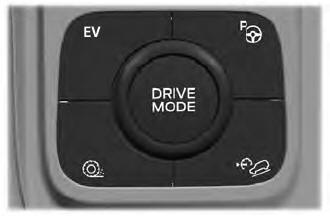
Your vehicle is equipped with selectable electric vehicle (EV) modes. Press the button on the center console to change the mode.
Depending on the driving mode you select, some EV modes may not be available. EV Now and EV Later modes are only available when you have electric driving range available.
Auto EV
 This mode automatically uses high voltage battery charge while driving, stays in electric mode when possible, and starts the engine when needed.
EV Charging
 In this mode, the engine is used to charge the high voltage battery, as compared to charging the vehicle from an electrical outlet.
Electric driving range gained through EV Charge allows you to switch to Auto EV or EV Now to operate on electricity later in your drive. The battery cannot fully charge to 100% in EV Charge mode. This is necessary to allow full operation of the regenerative braking system. When the battery reaches the EV Charge limit, the vehicle remains in EV Charge mode and maintains this charge level until you select another EV mode, or until you turn your vehicle off.
When you turn on EV Charge, a white EV Charge icon appears in the information display.
EV Charge resets to Auto EV when you turn your vehicle off. You can select EV Charge again using the EV button during your next trip.
EV Later
 In EV Later, your vehicle operates on the engine as needed and saves most of the available electric range for later use in Auto EV or EV Now mode.
For example, your initial trip is on high speed open roads, but later your trip is at low speed in urban areas, where only electric driving is most efficient. In this case, you can select EV Later for the higher speed portion of your trip, and then select Auto EV or EV Now for the urban portion.
When you turn on EV Later, a white EV Later icon appears in the information display. EV Later resets to Auto EV when you turn your vehicle off. You can select EV Later again using the EV button during your next trip.
When you select EV Later with the vehicle fully or nearly fully charged, some electric-only driving range is used to deplete the battery. This is to allow full operation of the regenerative braking system.
EV Now
 This mode provides an electric-only driving experience. Do not use EV Now when towing a trailer. The electric drive system is not designed for towing. The EV Now information screen appears on request. This screen allows you to enable the engine in EV Now mode.
Your vehicle may accelerate more slowly and the maximum speed may be lower than when in Auto EV mode.
You can enable your engine at any time using one of the following methods:
- Press the OK button on the steering wheel while viewing the EV Now request information screen. Your vehicle enables the engine as needed and returns to EV Now mode when no longer needed.
- Fully press the accelerator pedal. A pop-up message appears. Press the OK button on the steering wheel to enable the engine. When the engine is no longer needed, your vehicle returns to EV Now. The message disappears if you release the accelerator pedal.
- Press the EV button. This exits EV Now mode and allows engine operation. To return to EV Now mode, select it again using the EV button.
Your vehicle may enter Engine Enabled mode if system conditions require it. A message appears if this occurs. This is normal system operation and your vehicle returns to EV Now mode when possible.
When you turn on EV Now mode, a blue EV Now icon appears in the information display. If your vehicle is in Engine Enabled mode, the EV Now icon turns yellow. EV Now mode exits when your available electric driving range reaches zero.
Test yourself
A quick Ford Escape quiz: every answer comes with an explanation and a link to the manual page.