Stereo Radio Receiver (H240, K240) (if equipped)
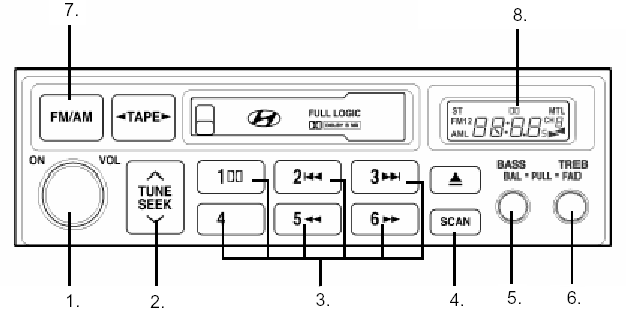
STEREO RADIO RECEIVER (H240, K240) (if equipped)
1. POWER ON/OFF knob, VOLUME knob
2. TUNE/SEEK button
3. Preset buttons
4. SCAN button
5. BASS/BAL pull knob
6. TREBLE/FAD pull knob
7. FM/AM band selector button 8. Liquid crystal display
1. POWER ON/OFF, VOLUME knob
Press this knob to turn on the audio system. The ignition switch must be in the ACC or ON position. Once the system is on, you can increase or decrease the volume by turning the knob clockwise or counterclockwise. Press the knob again to turn the system off.
2. TUNE button
Press and hold the Press the
 button for less than 0.5 seconds to decrease the frequency.
If the button is held for 0.5 seconds or more, a beep will sound and the frequency will change rapidly.
If you release the button after the beep, the SEEK function starts.
• SEEK. Press and hold thebutton for more than 0.5 seconds and release it after the beep. The receiver will tune to the next receivable station with a higher frequency. Similarly, press and hold thebutton for more than 0.5 seconds and release it after the beep. The receiver will tune to the next receivable station with a lower frequency. If the selected station is already stored in memory, the channel will also be shown on the display.
3. PRESET
(Preset)
Press one of these buttons for less than 2 seconds to listen to a stored station. Press and hold a preset button for 2 seconds or more to store the current station in memory.
4. SCAN button
When this button is pressed, the frequency will increase until the receiver tunes to the next receivable station. Each station is played for 5 seconds. When the desired station is found, press the SCAN button again to cancel the scan function.
5. BASS/BAL push button (bass/balance). Press the button so that it pops out.
To increase the bass level, turn the button clockwise. To decrease the bass level, turn the button counterclockwise.
Pull the button toward you to adjust the balance.
Turn the button clockwise to increase the volume of the right speaker.
(The volume of the left speaker will decrease.) When the button is turned counterclockwise, the volume of the left speaker will increase. (The volume of the right speaker will decrease.)
6. TREBLE/pull-FAD push button (treble/fader). Press the button so that it pops out.
To increase the treble level, turn the button clockwise. To decrease the treble level, turn the button counterclockwise.
Pull the button toward you to adjust the fader.
Turn the button counterclockwise to increase the volume of the front speaker.
(The volume of the rear speaker will decrease.) When the button is turned clockwise, the volume of the rear speaker will increase. (The volume of the front speaker will decrease.)
7. FM/AM band selector button. The FM/AM band selector button is used to change the band in the following sequence:
FM1 FM2AMFM1 (FM1FM2MLFM1: Europe)
8. Liquid crystal display
The liquid crystal display shows the following information: FM1/FM2/AM frequency band, preset channel number, ST when FM stereo is received.
Test yourself
A quick Hyundai H1 quiz: every answer comes with an explanation and a link to the manual page.