CD player (H280) (if equipped)
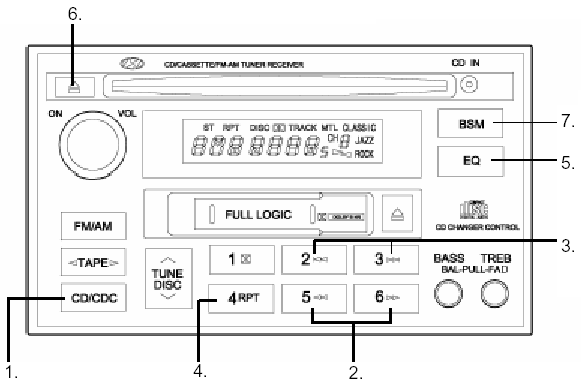
CD PLAYER (H280) (if equipped)
1. CD select button
2. Fast forward/rewind button
3. TRACK UP/DOWN
4. REPEAT button
5. EQUALIZER button
6. CD EJECT button
7. SCAN button (if equipped)
1. CD play select button
• Insert the CD with the label side facing down.
• Insert a CD to start CD playback while the radio or tape is operating.
• When a CD is inserted, press the button to start CD playback even if the radio or tape is operating.
• The compact disc player can be used when the ignition switch is in the "ON" or "ACC" position.
2. FF/REW (  ) To skip to the following tracks on the disc or return to previous tracks, press and hold FF (
 ) or REW (
 ).
When the button is released, the player resumes playback.
3. TRACK UP/DOWN
Use the track number on the CD to select the track to play.
• Press press once to skip to the beginning of the next track.
• Press once to return to the beginning of the current track.
4. REPEAT button
To repeat the track being played, press the RPT button. To cancel, press this button again.
If repeat is not cancelled, the track will automatically play again when it ends. This will continue until you press the button again.
5. EQUALIZER button
Press the EQ button to select the desired tone quality: CLASSIC, JAZZ, ROCK and DEFEAT MODE. Each press of the button changes the display as follows:
CLASSIC JAZZROCKDEFEAT
6. CD EJECT button
When the eject button is pressed is pressed and a compact disc is in the player, the disc will eject.
7. SCAN button (if equipped)
Press the SCAN button to play the first 10 seconds of each track.
To play the desired track, press the SCAN button again while the desired track is playing for 10 seconds.
• To ensure proper operation of the unit, keep the vehicle interior temperature within the normal range using the air conditioning or heating system.
• When replacing a fuse, use a fuse with the specified amperage rating.
• When the vehicle battery is disconnected, all preset stations are erased. In this case, all data must be set again.
• Do not apply any oil to rotating parts. Keep magnets, screwdrivers or other metal parts away from the tape transport mechanism and head.
• This unit is designed for use only with a 12-volt DC battery with negative ground.
• This unit contains precision parts. Do not attempt to disassemble or adjust it yourself.
• While driving, keep the volume low enough that you can hear sounds from outside the vehicle.
• Do not immerse this unit (including the speakers) in water or any other liquid.
Test yourself
A quick Hyundai H1 quiz: every answer comes with an explanation and a link to the manual page.