Radio cassette player (H240, K240) (if equipped)
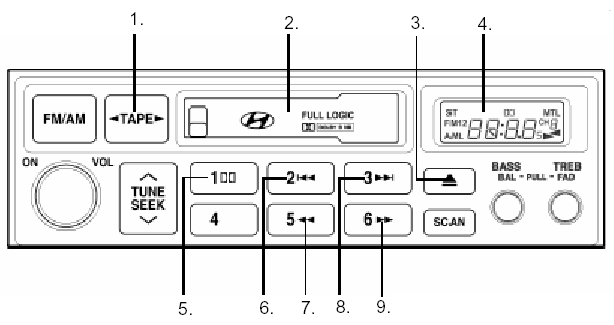
RADIO CASSETTE PLAYER (H240, K240) (if equipped)
1. Tape mode and side selector button
2. Cassette slot
3. EJECT button
4. Liquid crystal display
5. DOLBY button
6. AMS-REW button
7. Rewind (REW) button
8. AMS-FF button
9. Fast forward (FF) button
1. Tape mode and side selector button
Press this button to play the inserted cassette. Once the TAPE mode is selected, you can play the other side of the cassette by pressing this button again.
2. Cassette slot
Insert the cassette into the loading slot with the open side facing right. The player will draw in the cassette and start playback automatically, even if the audio system is off and the ignition switch is in the "ACC" or "ON" position.
3. EJECT button ( )
Press this button to eject the cassette. The cassette will eject even if the ignition switch is in the "OFF" position.
4. Liquid crystal display
The LCD shows the operating mode of the cassette being played. It informs the driver of the playback status, tape direction FF or REW, MTL when metal tape is used, Dolby, etc.
5. DOLBY button
When playing a cassette recorded in Dolby mode, press this button to reduce background noise. When this button is pressed, the indicator will be displayed . If the button is pressed again,will disappear.
6. AMS-REW button ( )
Press this button to rewind the tape quickly and start playback from the beginning of the current music track.
During AMS-REWINDING, "REW" flashes on the display.
If the button is pressed again, rewinding stops and playback starts again.
7. Rewind button ( )
You can rewind the tape to the beginning by pressing the "" button during playback ("Rew" is shown on the display). Tape playback will start when the "" button is pressed again during REW mode.
8. AMS-FF button ( )
Press this button to fast forward the tape quickly and start playback from the beginning of the next music track. During AMS-FF, "FF" flashes on the display.
To stop FF and start playback, press the button again.
9. Fast forward button ( )
You can fast forward the tape to the end by pressing the "" button during playback ("FF" is shown on the display). If the "" button is pressed again in FF mode, cassette playback will start.
Test yourself
A quick Hyundai H1 quiz: every answer comes with an explanation and a link to the manual page.