Convenience
Deleting the Digital Key (Key Card)
In this manual: Convenience
~1min read
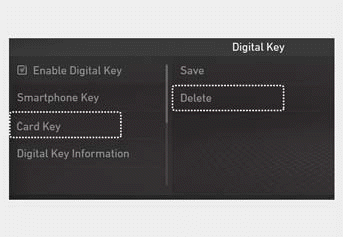
1. Turn on the vehicle with the smart key and make sure to keep the smart key inside the vehicle during the deletion process.
2. Delete your digital key (key card) from the infotainment system. From the settings menu, go to Settings > Vehicle > Digital Key > Key Card, then select Delete.
Information
- The Delete button is not available if no digital key (key card) is saved.
- If the digital key (key card) is deleted, it can be re-registered to the same vehicle as long as a new digital key (key card) is not registered.
- If you register a new digital key (key card), the previously registered digital key (key card) will no longer be active and cannot be re-registered.
Test yourself
A quick Hyundai Tucson LM quiz: every answer comes with an explanation and a link to the manual page.
Was this page helpful?