Convenience
Starting the Engine
In this manual: Convenience
~1min read
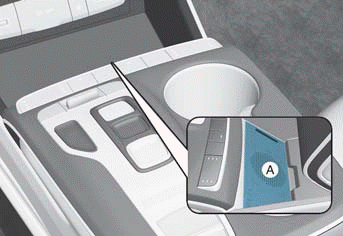
A: Vehicle Authentication Panel (wireless charging pad)
1. After placing your registered key card on the vehicle authentication panel (wireless charging pad), depress the brake pedal and press the Start button.
2. After starting, the digital key data will be automatically updated within 5 to 20 seconds. Remove the digital key (key card) from the pad.
Information
- If you do not place the digital key (key card) in the center of the vehicle authentication panel (wireless charging pad), the engine may not start. Remove the digital key (key card) and then try again.
- If the digital key (key card) is placed near other NFC-enabled cards, such as a transit card or credit card, they may not be recognized. For more information, refer to the "Engine Start/Stop Button" section in Chapter 6.
- Always remove the digital key (key card) from the authentication pad (wireless charging pad) after the engine is started. If you leave the key card on the wireless charging panel while driving, the digital key (key card) may malfunction.
Test yourself
A quick Hyundai Tucson LM quiz: every answer comes with an explanation and a link to the manual page.
Was this page helpful?