Getting Started
The following procedures will help you get started using the NISSAN voice recognition Bluetooth® hands-free phone system. For additional command options, see the "Voice command list" section in this chapter.
Selecting a Language
You can interact with the Bluetooth® phone system in English, Spanish or French.
Change the language as follows.
- Press and hold the
 for more than five seconds.
- The system announces: "Press the phone activation button (

) to switch the hands-free system to voice adaptation mode, or press the phone activation button ( ) to select another
language." - Press the button
 .
For more information about voice adaptation, see the "Voice Adaptation Mode" section in this chapter.
- The system announces the current language and allows you to switch to Spanish or French.
 ). To select a different
language, toggle the tuning switch (
 or
 ) up or
down.
NOTE:
You must press the  button
within 5 seconds to change the language.
- Do not press any button if you decide not to change the language. After five seconds, the voice recognition session ends and the language remains unchanged.
Pairing Procedure
NOTE:
Perform pairing when the vehicle is stationary. The process is cancelled if the vehicle starts moving during pairing.
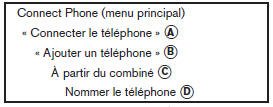
- Press the button
 on the
steering wheel. The system announces the available commands. - Say: "Connect phone" A . The system acknowledges the command and announces the next set of available commands.
- Say: "Add phone" B . The system acknowledges the command and prompts you to start pairing the phone C .
The pairing process varies depending on the phone model. Refer to the cellular phone user's guide for more information.
You can also visit www.nissanusa.com/bluetooth for pairing instructions for phones recommended by NISSAN.
When the system prompts you to enter a PIN code, enter "1234" on the phone.
The PIN code "1234" is assigned by NISSAN and cannot be changed.
If the name is too long or too short, the system will notify you and then prompt you to enter a name again.
In addition, if more than one phone is paired and the name is too similar to a name already in use, the system will notify you and then prompt you to enter a name again.Placing a Call by Entering a Phone Number

- Press the button
 on the
steering wheel. A tone sounds. - Say: "Call" A . The system acknowledges the command and announces the next set of available commands.
- Say: "Phone number" B . The system acknowledges the command and announces the next set of available commands.
Say: "Special digits" to dial more than 10 digits or special characters.
For example, for 555 121-3354, you can say "five five five" for the first group, "one two one" for the second group, and "three three five four" for the third group.
To dial more than 10 digits or one or more special characters, say: "Special number". See the "Digits" section in this chapter for more information.Receiving a Call
When you hear the tone, press the button on the steering wheel.
To end the call, press the button
on the steering wheel.
NOTE:
If you do not want to take the call when you hear the ringtone, press the  button on the steering wheel.
See the "Voice command list" later in this chapter.
Test yourself
A quick Nissan Altima quiz: every answer comes with an explanation and a link to the manual page.