Controls and instruments
Programming the HomeLinkMD Transceiver
In this manual: Controls and instruments
4steps
~29min
2/5difficulty
1special tools
Done 0 of 4
If you have questions about programming the HomeLinkMD buttons, or if you experience difficulties during programming, refer to the HomeLinkMD website at www.homelink.com, or call 1 800 355-3515.
NOTE:
Place the ignition switch in the ACC (accessory) position when programming the HomeLinkMD remote. It is also recommended to install a new battery in the handheld remote of the device to be programmed to the HomeLinkMD system for faster programming and more accurate signal transmission.
- Hold the end of the handheld remote 2 to 8 cm (1 to 3 in) from the surface of the HomeLinkMD remote while watching the HomeLinkMD indicator light 1.
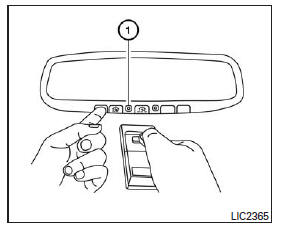
- Using both hands, simultaneously press and hold the desired button on the HomeLinkMD remote and the button on the handheld remote. Do NOT release the buttons until the HomeLinkMD indicator light 1 flashes slowly and then rapidly. When the light flashes rapidly, release both buttons. (Rapid flashing indicates that programming was successful.)
NOTE:
For certain devices, replace step 2 with the cycling procedure described in the section "HomeLinkMD Remote Programming for Canada and Gate Openers".
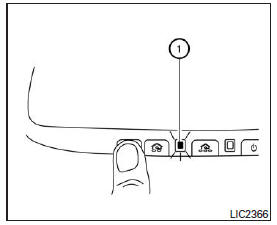
- Press and hold the programmed HomeLinkMD button and observe the indicator light.
- If indicator light 1 remains on continuously, programming is complete and the device should activate when you briefly press the HomeLinkMD button.
- If indicator light 1 flashes rapidly for two seconds, then remains on continuously, perform steps 4 to 6 to program a rolling code device. Assistance from another person may make the following steps easier. Use a ladder or other suitable device. Do not stand on your vehicle to perform the next steps.
- On the garage door opener receiver in the garage, locate the "learn" or "smart" button (the name and color of the button may vary by manufacturer, but it is usually located near where the antenna wire is attached to the unit). If you have difficulty locating the button, refer to the garage door opener manual.
- Briefly press the "learn" or "smart" button.
- Return to the vehicle and firmly press and hold the programmed HomeLinkMD button for two seconds, then release it. Repeat the "press and hold, then release" sequence up to three times to complete the learning procedure. The HomeLinkMD remote should now operate your rolling code device.
- If you have questions about programming your HomeLinkMD remote buttons, or if you experience difficulties during programming, visit the HomeLinkMD website at www.homelink.com, or call 1 800 355-3515.
Test yourself
A quick Nissan Altima quiz: every answer comes with an explanation and a link to the manual page.
Was this page helpful?