Replacing the batteries
WARNING
Keep the battery and removed parts away from children to prevent swallowing.
NISSAN Intelligent KeyMD
To replace the Intelligent Key battery, proceed as follows:
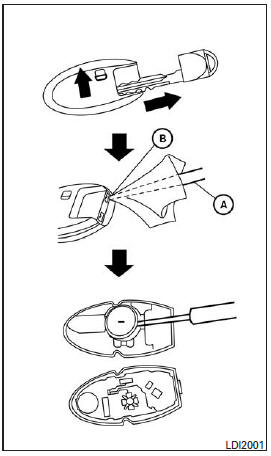
- Remove the mechanical key from the Intelligent Key.
- Insert a small flat-blade screwdriver A into the slot B at the corner and turn it to separate the upper and lower parts.
Recommended battery: CR2032 or equivalent.
- Do not touch the internal circuits or electrical terminals to avoid damaging them.
- Hold the battery by its edges. Do not hold the battery by its contact surfaces, as this will greatly reduce battery power.
- Position the + end facing down toward the housing.
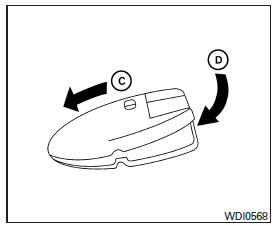
- Close the cover firmly as shown C D .
- Press the buttons to check operation.
Consult a NISSAN dealer if you need assistance with replacement.
FCC Notice: In the United States: This device complies with Part 15 of the FCC Rules. Operation is subject to the following two conditions: (1) this device may not cause harmful interference, and (2) this device must accept any interference received, including interference that may cause undesired operation.
Note: Changes or modifications not expressly approved by the party responsible for compliance could void the user's authority to operate the equipment.
In Canada: This device complies with Industry Canada RSS-210. Operation is subject to the following two conditions: (1) this device may not cause harmful interference, and (2) this device must accept any interference, including interference that may cause undesired operation of the device.
Test yourself
A quick Nissan Altima quiz: every answer comes with an explanation and a link to the manual page.