Setting the Set Speed
To change the set speed, push the control lever down/up until the desired speed is displayed.
- Increasing the speed
- To decrease the speed
Fine adjustment: Tap the control lever in the desired direction.
Large adjustment: Push and hold the control lever up or down to change the speed, then release it when the desired speed is reached.
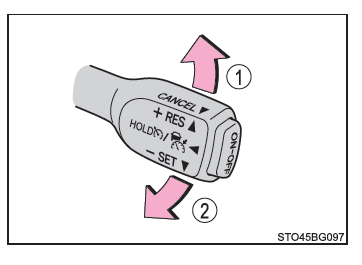
In distance control mode, the set speed is increased or decreased as follows:
Fine adjustment: By 5 km/h*1 or 8 km/h*2 each time the control lever is tapped
Large adjustment: Increased or decreased in steps of 5 km/h*1 or 8 km/h*2 while the control lever is held
In constant speed cruise control mode, the set speed is increased or decreased as follows:
Fine adjustment: By 1 km/h*1 or 1.6 km/h*2 each time the control lever is tapped
Large adjustment: The speed continues to change while the control lever is held.
*1: When the set speed is displayed in "km/h"
*2: When the set speed is displayed in "MPH"