Navigation
No Sound can be Heard from Speakers
In this manual: Navigation
2steps
~12min
1/5difficulty
Done 0 of 2
INSPECTION PROCEDURE
1 CHECK AUDIO SETTINGS
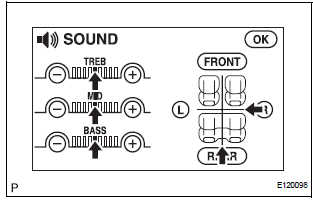
- Enter the sound adjustment screen by pressing the "SOUND" switch on the AUDIO display.
- Set volume, fader, and balance to the initial values and check that sound is normal.
OK: Audio system returns to normal.
HINT: Sound quality adjustment items vary depending on the type of the amplifier.
PROCEED TO NEXT CIRCUIT INSPECTION SHOWN IN PROBLEM SYMPTOMS TABLE
Test yourself
A quick Toyota Sienna quiz: every answer comes with an explanation and a link to the manual page.
Was this page helpful?