Navigation
Vehicle Position Mark is not Updated
In this manual: Navigation
2steps
~12min
1/5difficulty
Done 0 of 2
INSPECTION PROCEDURE
1 CHECK MAP DISC
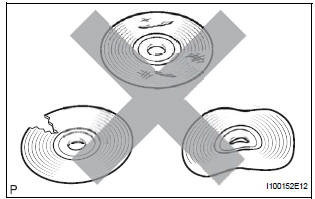
- Check that the map disc is not deformed or cracked.
OK: No deformations or cracks on map disc.
2 CHECK MAP DISPLAY
- Check if a touch scroll can be performed on the map display.
OK: Touch scroll can be performed
3 CHECK VEHICLE SENSOR (NAVIGATION CHECK MODE)
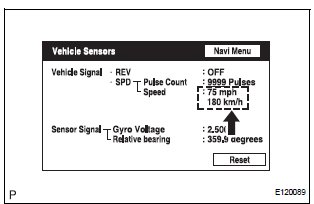
- Enter the "Navigation Check" mode (Vehicle Sensors).
- While driving the vehicle, compare the "Speed" indicator to the reading on the speedometer. Check if these readings are almost equal.
OK: The readings are almost equal.
PROCEED TO NEXT CIRCUIT INSPECTION SHOWN IN PROBLEM SYMPTOMS TABLE
Test yourself
A quick Toyota Sienna quiz: every answer comes with an explanation and a link to the manual page.
Was this page helpful?