Navigation
Vehicle Position Mark Deviates Greatly
In this manual: Navigation
2steps
~12min
1/5difficulty
Done 0 of 2
INSPECTION PROCEDURE
1 CHECK GPS MARK

- Check that the GPS mark is displayed.
OK: GPS mark is displayed
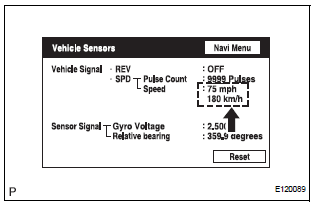
2 CHECK VEHICLE SENSOR (NAVIGATION CHECK MODE)
- Enter the "Navigation Check" mode (Vehicle Sensors).
- While driving the vehicle, compare the "Speed" indicator to the reading on the speedometer. Check that these readings are almost equal.
OK: The readings are almost equal.
3 CHECK VEHICLE SENSOR (NAVIGATION CHECK MODE)

- Check that the display changes between ON and OFF according to the shift lever operation (P and R).
OK

HINT: The display is updated once per second. It is normal for the display to lag behind the actual switch operation.
PROCEED TO NEXT CIRCUIT INSPECTION SHOWN IN PROBLEM SYMPTOMS TABLE
Test yourself
A quick Toyota Sienna quiz: every answer comes with an explanation and a link to the manual page.
Was this page helpful?