Date and Time
The clock is displayed on both the instrument panel and the center display.
Clock location
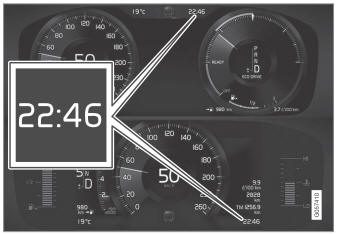
Clock location on the 12-inch * and 8-inch instrument panels. The illustration is generic - details may vary according to vehicle model.
Certain messages and other information may obscure the clock in the instrument panel.
In the center display, the clock is located on the upper right-hand side in the status bar.
Date and time settings
- Select Settings
 System
 Date and Time in the center display's Top view to change settings for time and date format.
Adjust the date and time by tapping the up or down arrows on the touchscreen.
Automatic time for vehicles with GPS
When the vehicle is equipped with a navigation system, Automatic time is also available. The time zone will then be set automatically to the vehicle's location. In some navigation systems, the current location must also be set to determine the correct time zone. If Automatic time is not selected, the time and date can be adjusted using the up and down arrows on the touchscreen.
Daylight saving time
In some countries, the Automatic daylight saving time setting can be selected to change automatically to daylight saving time. In other countries, the daylight saving time setting can be selected manually.
* Option/accessory.
Test yourself
A quick Volvo XC90 quiz: every answer comes with an explanation and a link to the manual page.