Instrument Panel
The instrument panel displays information related to the vehicle and driving.
The instrument panel contains monitoring and warning sensors, indicators and symbols. What is shown in the instrument panel varies depending on the equipment, settings and functions currently active.
The instrument panel is activated as soon as a door is opened, i.e. in ignition mode 0. The panel will power down after a short period of time if it is not used. To reactivate it, do one of the following:
- Depress the brake pedal.
- Activate ignition mode I.
- Open one of the doors.
The instrument panel is available in two versions: 8" and 12"*.
8-inch instrument panel
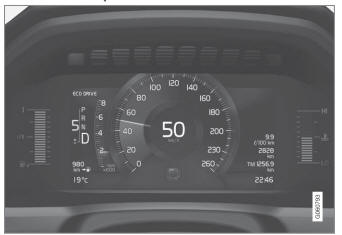
The illustration is generic - details may vary according to vehicle model.
Location on the instrument panel:

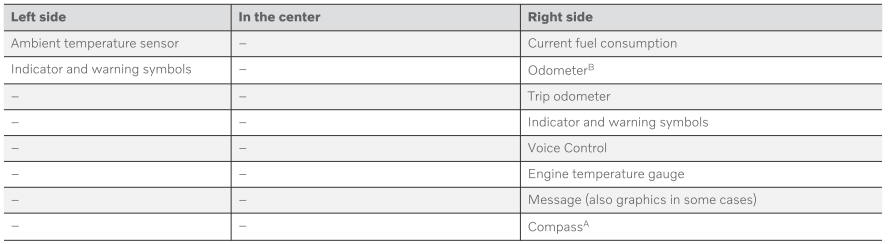
A Depends on the selected drive mode.
B Total distance.
12-inch instrument panel *
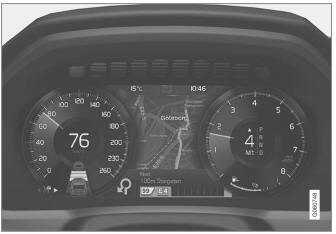
The illustration is generic - details may vary according to vehicle model.
Location on the instrument panel:
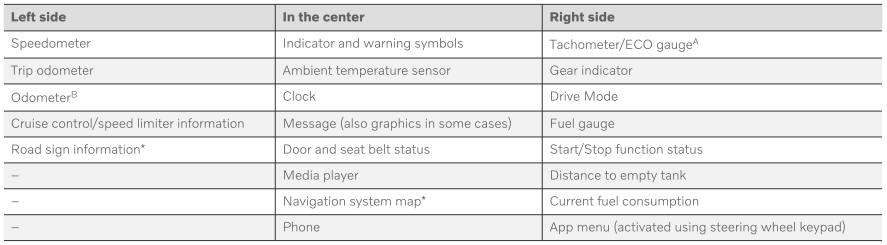

A Depends on the selected drive mode.
B Total distance.
Dynamic symbol
 Dynamic symbol in basic mode.
In the center of the instrument panel is a dynamic symbol that changes appearance according to the type of message displayed. The severity of the control or warning symbol is indicated by a red or amber-colored marking around the symbol.
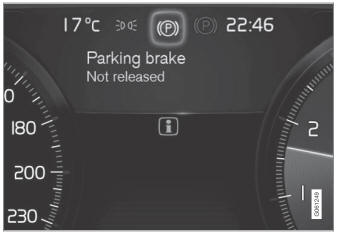
Example with indicator symbol.
An animation may be used to change the symbol into a graphic image to depict the location of a problem or to clarify information.
* Option/accessory.
Test yourself
A quick Volvo XC90 quiz: every answer comes with an explanation and a link to the manual page.