Handling Messages on the Instrument Panel
Messages in the instrument panel are controlled using the right-side steering wheel keypad.
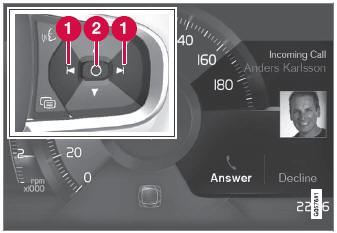
Examples of messages in the instrument panel1 and the right-side steering wheel keypad.
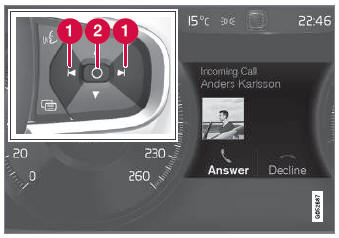
Examples of messages in the instrument panel2 and the right-side steering wheel keypad. The illustration is generic - details may vary according to vehicle model.
 Left/right
 Confirm
Some messages on the instrument panel contain one or more buttons for, for example, confirming the message or accepting a request.
Handling New Messages
For messages with buttons:
- Switch between buttons by pressing left or right (1).
- Confirm your selection by pressing confirm (2).
- The message will disappear from the instrument panel.
For messages without buttons:
- Close the message by pressing confirm (2) or let the message automatically timeout after a short period.
- The message will disappear from the instrument panel.
Messages that need to be saved are stored in the Car Status app, which can be opened from the App view in the center display. The message Vehicle message stored in Car Status app will simultaneously appear in the center display.
1 With 8" instrument panel.
2 With 12" instrument panel.
Test yourself
A quick Volvo XC90 quiz: every answer comes with an explanation and a link to the manual page.