Displays and Controls
Displaying trip data on the instrument panel
In this manual: Displays and Controls
3steps
~18min
2/5difficulty
Done 0 of 3
Data recorded and calculated by the trip computer can be displayed on the instrument panel.
This data is stored in the Trip Computer app. You can choose which information the instrument panel will display in the app menu.
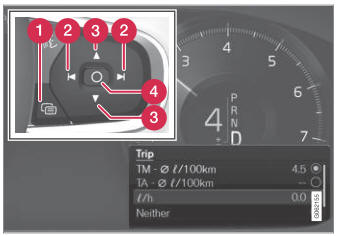
Open and navigate in the app menu1 using the righthand steering wheel keypad.
 App menu
 Left/right
 Up/down
 Confirm
- Open the app menu in the instrument panel by pressing (1).
(The App menu cannot be opened while there is an unacknowledged message in the instrument panel. The message must be acknowledged by pressing the O button (4) before the App menu can be opened).
- Navigate to the trip computer app by mov- ing left or right using (2).
- The top four menu rows show measured values for trip odometer TM. The next four menu rows show measured values for trip odometer TA. Scroll up or down in the list using (3).
- Scroll down to the option buttons to choose which information to show in the instrument panel:
- Odometer
- Distance to empty
- Trip (alternative speedometer)
- Mileage for trip odometer TM, TA, or no mileage
- Current fuel consumption, average fuel consumption for TM or TA, or no display of fuel consumption
Select or clear a selection using the O button (4). The change will apply immediately.
1 The illustration is generic - details may vary according to vehicle model.
Test yourself
A quick Volvo XC90 quiz: every answer comes with an explanation and a link to the manual page.
Was this page helpful?