Utilisation du clavier de l'écran central
You can use the keyboard in the center display to enter characters or to switch to handwriting mode to "write" letters and characters on the screen.
The keyboard can be used to enter characters (letters, numbers, symbols, etc.) to e.g. send text messages from the vehicle, enter passwords or search for information in the digital Owner's Manual.
Le clavier n'apparaît que lorsqu'une saisie de texte est possible à l'écran.
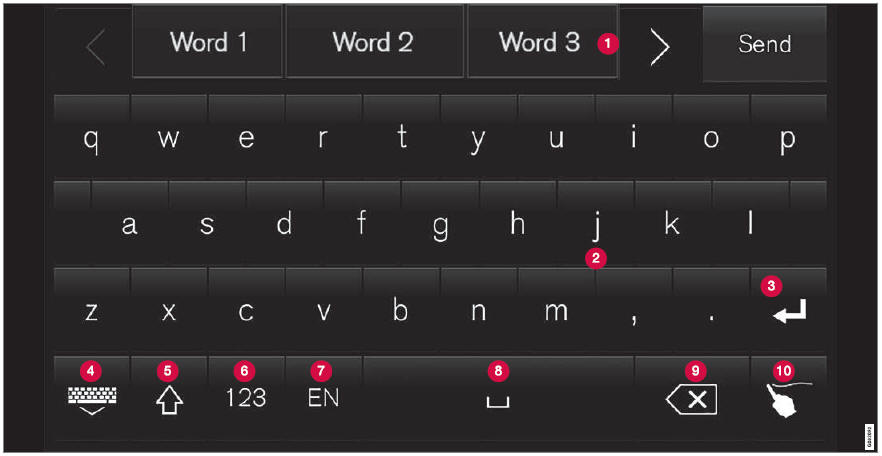
The illustration shows an overview of some of the buttons that may be shown on the keyboard. The appearance may vary depending on language settings and the context in which the keyboard is used.
 Row showing suggestions for words or characters1. The suggested words change as new letters are entered. Scroll through the list of suggested words by tapping the right or left arrows. Tap a suggestion to select it. Please note that this function is not available in all languages. When unavailable, this row will not be shown on the keyboard.
 Available characters are adapted to the language selected for the keyboard (see number 7 below). Tap a character to enter it.
 Différents boutons s'affichent selon le contexte d'utilisation du clavier, par ex. @ pour saisir une adresse e-mail, ou la touche Entrée pour commencer une nouvelle ligne.
 This button hides the keyboard. In cases where this is not possible, the button will not be displayed.
 Used to enter uppercase letters. Tap once to enter one uppercase letter and then continue with lowercase letters. Tap twice for caps lock (all text will be entered in uppercase letters). Tap again to return the keyboard to lowercase letters. In this mode, the first letter after a period, exclamation point or question mark will be automatically entered in uppercase form. The first letter entered in text fields will also be uppercase. In text fields intended for names or addresses, each word will be automatically started with an uppercase letter. In text fields intended for passwords, website addresses or email addresses, all letters will automatically be lowercase unless uppercase is selected.
 Used to enter numbers. The number keyboard (2) will then be displayed. Tap
 , which is shown instead of
 in number mode, to return to the keyboard with letters, or
 to display the keyboard with special characters.
 Permet de changer la langue du clavier, par ex. FR. Les caractères disponibles et les suggestions de mots (1) varient selon la langue sélectionnée. Pour basculer entre les langues du clavier, celles-ci doivent d'abord être ajoutées dans les Réglages.
 Space bar.
 Delete. Tap to delete characters one at a time. Press and hold to delete multiple characters quickly.
 Used to change to handwriting mode.
Tap the confirm button over the keyboard (not shown in illustration) once to confirm the text that has been entered. The button's appearance differs depending on the context.
Variantes de lettres ou de symboles
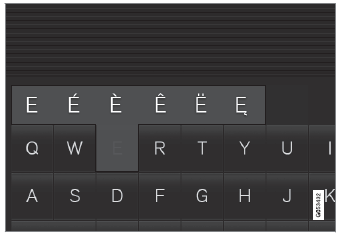
Variants of a letter or character, e.g. é or è, can be entered by pressing and holding the letter or character. A box containing possible variants of the letter or character will appear. Tap the desired variant. If no variant is selected, the original letter/character will be used.
1 Pour les langues asiatiques.
Testez-vous
Un quiz rapide sur Volvo XC90 : chaque réponse est expliquée, avec un lien vers la page du manuel.