Affichage des données de trajet sur le combiné d'instruments
Data recorded and calculated by the trip computer can be displayed on the instrument panel.
Ces données sont enregistrées dans l'application Ordinateur de bord. Vous pouvez choisir les informations affichées sur le combiné d'instruments dans le menu de l'application.
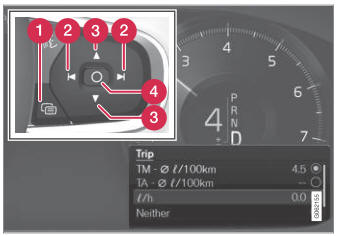
Open and navigate in the app menu1 using the righthand steering wheel keypad.
 App menu
 Left/right
 Up/down
 Confirm
- Open the app menu in the instrument panel by pressing (1).
(The App menu cannot be opened while there is an unacknowledged message in the instrument panel. The message must be acknowledged by pressing the O button (4) before the App menu can be opened).
- Navigate to the trip computer app by mov- ing left or right using (2).
- Les quatre premières lignes du menu affichent les valeurs mesurées pour le compteur journalier Trip TM. Les quatre lignes suivantes affichent les valeurs mesurées pour le compteur journalier Trip TA. Faites défiler la liste vers le haut ou vers le bas à l'aide de (3).
- Scroll down to the option buttons to choose which information to show in the instrument panel:
- Odomètre
- Autonomie
- Trip (compteur de vitesse alternatif)
- Distance pour le compteur journalier Trip TM, TA ou absence de compteur journalier
- Current fuel consumption, average fuel consumption for TM or TA, or no display of fuel consumption
Select or clear a selection using the O button (4). The change will apply immediately.
1 The illustration is generic - details may vary according to vehicle model.
Testez-vous
Un quiz rapide sur Volvo XC90 : chaque réponse est expliquée, avec un lien vers la page du manuel.