Дисплей и голосовой контроль
Отображение данных поездок на панели прибора
Место в руководстве: Дисплей и голосовой контроль
3шагов
~18мин
2/5сложность
Выполнено 0 из 3
Data recorded and calculated by the trip computer can be displayed on the instrument panel.
Эти данные хранятся в приложении Trip Computer. You can choose which information the instrument panel will display in the app menu.
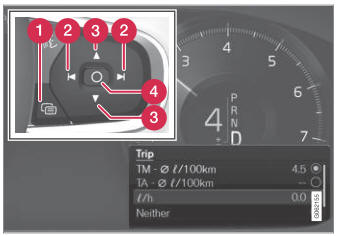
Open and navigate in the app menu1 using the righthand steering wheel keypad.
 App menu
 Left/right
 Up/down
 Confirm
- Open the app menu in the instrument panel by pressing (1).
(The App menu cannot be opened while there is an unacknowledged message in the instrument panel. The message must be acknowledged by pressing the O button (4) before the App menu can be opened).
- Navigate to the trip computer app by mov- ing left or right using (2).
- Четыре лучших ряда меню показывают измеренные значения для одометра Trip TM. The next four menu rows show measured values for trip odometer TA. Scroll up or down in the list using (3).
- Scroll down to the option buttons to choose which information to show in the instrument panel:
- Одометр
- Расстояние до пустого танка
- Турист (альтернативный спидометр)
- Пробег для Trip Odometer TM, TA или отсутствие пробега
- Current fuel consumption, average fuel consumption for TM or TA, or no display of fuel consumption
Select or clear a selection using the O button (4). The change will apply immediately.
1 The illustration is generic - details may vary according to vehicle model.
Проверьте себя
Короткий тест по Volvo XC90: после ответа — пояснение и ссылка на страницу руководства.
Страница помогла?