Pantalla y control por voz
Visualización de los datos de viaje en el cuadro de instrumentos
En este manual: Pantalla y control por voz
3pasos
~18min
2/5dificultad
Hecho 0 de 3
Data recorded and calculated by the trip computer can be displayed on the instrument panel.
Estos datos se almacenan en la aplicación del ordenador de viaje. Puede elegir qué información mostrará el cuadro de instrumentos en el menú de la aplicación.
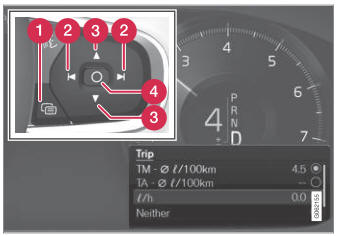
Open and navigate in the app menu1 using the righthand steering wheel keypad.
 App menu
 Left/right
 Up/down
 Confirm
- Open the app menu in the instrument panel by pressing (1).
(The App menu cannot be opened while there is an unacknowledged message in the instrument panel. The message must be acknowledged by pressing the O button (4) before the App menu can be opened).
- Navigate to the trip computer app by mov- ing left or right using (2).
- Las cuatro primeras filas del menú muestran los valores medidos del cuentakilómetros parcial TM. Las siguientes cuatro filas muestran los valores del cuentakilómetros parcial TA. Desplácese hacia arriba o hacia abajo en la lista usando (3).
- Scroll down to the option buttons to choose which information to show in the instrument panel:
- Odómetro
- Autonomía con el depósito vacío
- Viaje (velocímetro alternativo)
- Distancia del cuentakilómetros parcial TM, TA o sin distancia
- Current fuel consumption, average fuel consumption for TM or TA, or no display of fuel consumption
Select or clear a selection using the O button (4). The change will apply immediately.
1 The illustration is generic - details may vary according to vehicle model.
Pon a prueba tus conocimientos
Un test rápido sobre el Volvo XC90: cada respuesta trae una explicación y un enlace a la página del manual.
¿Le resultó útil esta página?