Обработка сообщений на панели прибора
Messages in the instrument panel are controlled using the right-side steering wheel keypad.
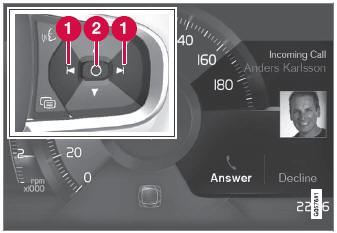
Examples of messages in the instrument panel1 and the right-side steering wheel keypad.
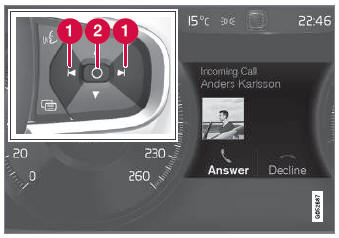
Examples of messages in the instrument panel2 and the right-side steering wheel keypad. The illustration is generic - details may vary according to vehicle model.
 Left/right
 Confirm
Некоторые сообщения на панели прибора содержат одну или несколько кнопок для, например, confirming the message or accepting a request.
Обработка новых сообщений
Для сообщений с кнопками:
- Перейдите между кнопками, нажав влево или вправо (1).
- Confirm your selection by pressing confirm (2).
- Сообщение исчезнет с панели прибора.
Для сообщений без кнопок:
- Close the message by pressing confirm (2) or let the message automatically timeout after a short period.
- Сообщение исчезнет с панели прибора.
Messages that need to be saved are stored in the Статус автомобиля app, which can be opened from the App view in the center display. The message Vehicle message stored in Car Status app will simultaneously appear in the center display.
1 With 8" instrument panel.
2 With 12" instrument panel.
Проверьте себя
Короткий тест по Volvo XC90: после ответа — пояснение и ссылка на страницу руководства.