Открытие контекстуальной настройки на дисплее центра
Most of the settings for the vehicle's basic apps can be changed directly in Top view in the center display via contextual settings.
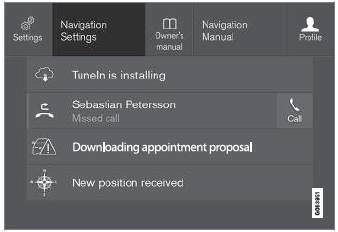
Вверху вид с кнопкой для контекстуальных настроек.
Contextual setting is a shortcut for accessing specific settings related to the active function displayed on the screen. Apps that are factoryinstalled in your vehicle, e.g. FM радио and USB, are part of Sensus and are used to control the vehicle's integrated functions. The settings for these apps can be changed directly via contextual setting in Top view.
Когда доступны контекстуальные настройки:
- Pull down Top view when an app is in expanded form, НАПРИМЕР. Навигация.
- Tap Настройки навигации.
- Откроется страница настроек навигации.
- Измените желаемые настройки и подтвердите.
Tap Закрывать or press the Home button under the center display to close Settings view.
Most of the vehicle's basic apps have this contextual setting option, but not all.
Сторонние приложения
Third-party apps are apps that are not factoryinstalled in the vehicle's system, but can be downloaded, e.g. Volvo ID. Settings for these apps are changed in the apps themselves, not in Top view.
Проверьте себя
Короткий тест по Volvo XC90: после ответа — пояснение и ссылка на страницу руководства.