Обработка плиток в центральном дисплее
Home view consists of four tiles: Навигация, СМИ, Телефон and a fourth tile. These views can be expanded.
Расширение плитки из стандартного режима
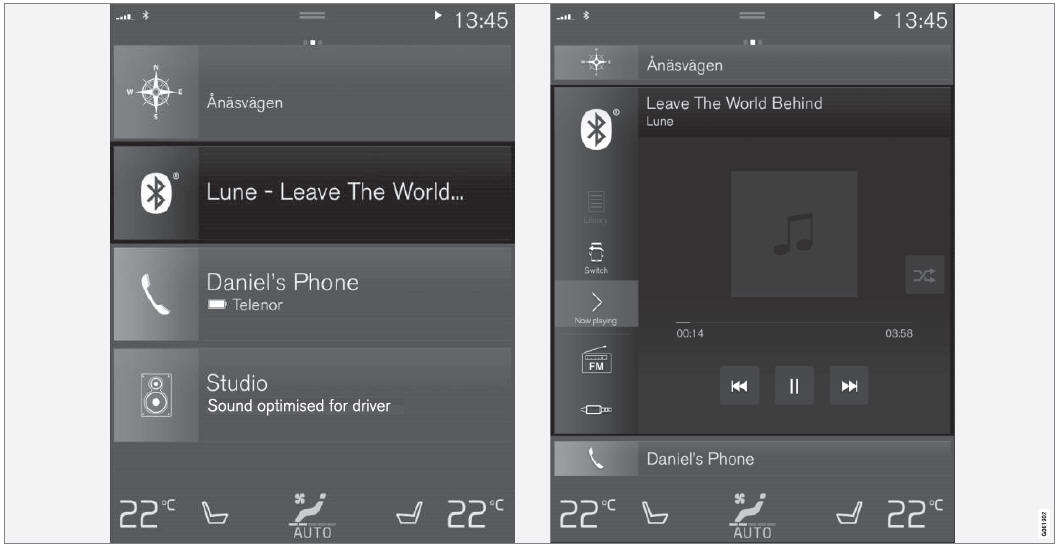
Стандартный режим и расширенный режим плитки на центральном дисплее.
Расширение плитки:
- For tiles Navigation, Media and Phone: Tap the screen anywhere in the tile. When a tile is expanded, the extra tile in Home view will be temporarily hidden. The other two tiles will be minimized and only show certain information. When the extra tile is tapped, the other three tiles are minimized and only certain information is displayed.
Expanded view provides access to the basic functions of the respective apps.
Закрытие расширенной плитки:
- The tile can be closed in three different ways:
- Нажмите на верхнюю часть расширенной плитки.
- Нажмите на другую плитку (а затем будет открыт в расширенном режиме).
- Кратко нажмите на кнопку «Домой» под центральным дисплеем.
Открытие или закрытие плитки в полноэкранном режиме
The fourth tile1 and tile for Навигация can be opened in full-screen mode to show additional information and possible settings.
When a tile is opened in full-screen mode, no information from the other tiles is displayed.
 In expanded mode, open the app in full-screen mode. Tap the symbol.
 To return to expanded mode, tap the symbol or press the Home button under the screen.
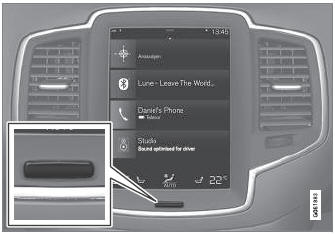
Кнопка «Центр дисплея».
Вы всегда можете нажать кнопку «Домой», чтобы вернуться к дому. To return to Home view's standard view from full-screen mode, press the Home button twice.
1 Does not apply to all apps or vehicle functions opened via the fourth tile.
Проверьте себя
Короткий тест по Volvo XC90: после ответа — пояснение и ссылка на страницу руководства.