Навигация в видах центрального дисплея
There are five different basic views in the center display: Home view, Top view, Climate view, App view and Function view. The screen is automatically activated when the driver's door is opened.
Домашний вид
Home view is the view displayed when the screen is activated. It consists of four tiles: Навигация, СМИ, Телефон and a fourth tile.
An app or vehicle function selected from the App or Function views will start in the respective tile in Home view. FM радио, for example, will start in the СМИ tile.
The extra tile displays the most recently used app or vehicle function that is not related to the other three tiles.
Плитки отображают краткую информацию о соответствующих приложениях.
- Определенные функции (например, using the center display's keyboard) may be deactivated.
- Certain texts (e.g. those generated by apps) will be shortened to three rows. Tap the Зачитать button to have the entire message read aloud.
- Text messages will be shortened to one row. Tap the Зачитать button to have the entire message read aloud.
Строка статуса
Текущие действия транспортных средств показаны в верхней части экрана в строке состояния. Информация о сети и подключении показана слева от строки состояния. Media-related information, the clock and information about background activities are shown to the right.
Верхний вид
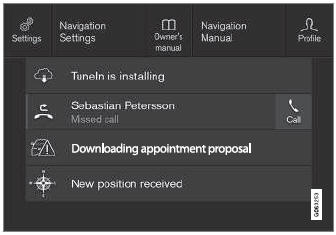
Вверху вид при расширении.
В центре строки состояния есть вкладка в верхней части экрана. Open Top view by tapping the tab or by dragging/swiping from the top of the screen downward.
Вверху видит всегда доступ к:
- Настройки
- Руководство владельца
- Профиль
- Хранимых сообщений автомобиля.
В некоторых случаях представление о вершине обеспечивает доступ к:
- Contextual setting (e.g. Настройки навигации). Change settings directly in Top view when an app (e.g. navigation) is being used.
- Contextual Owner's Manual (e.g. Навигационное руководство). Access articles in the digital Owner's Manual related to the content shown on the screen, directly in Top view.
To exit Top view, tap the screen outside Top view, press the Home button or tap the screen at the bottom of Top view and swipe upward. The views behind will become visible again and can be used.
Климатическое мнение
Климатическая полоса всегда видна в нижней части экрана. The most common climate settings can be made directly there, such as setting temperature and seat heating*.
 Tap the symbol in the center of the climate bar to open Climate view and access additional climate system settings.
 Tap the symbol to close Climate view and return to a previous view.
Приложение
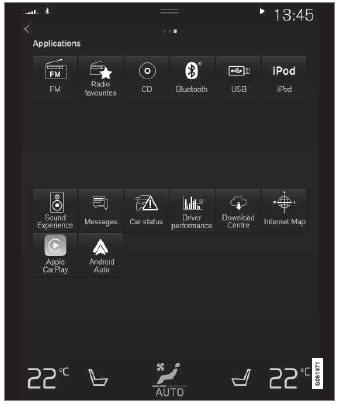
Просмотр приложения показывает приложения автомобиля.
Swipe the screen from right to left8 to access the App view from the Home view. This view displays downloaded apps (third-party apps) as well as apps for integrated functions, such as FM радио. Brief information will be displayed directly in App view for certain apps, such as unread text messages for Сообщения.
Tap an app to open it. It will then be opened in its associated tile, e.g. СМИ.
В зависимости от количества приложений, можно прокрутить вниз в представлении приложения. This is done by sweeping/dragging from the bottom upwards.
To return to Home view, swipe the screen from left to right1 or press the Home button.
Функциональный вид
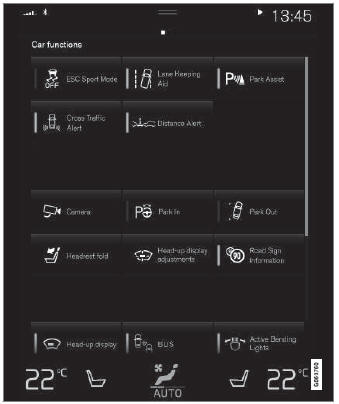
Вид функции с кнопками для различных функций транспортного средства.
Swipe the screen from left to right1 to access Function view from Home view. From Function view, you can activate or deactivate various vehicle functions such as Пламя*, Лейн соблюдает помощь* and Парк помощи*.
Если есть много функций, вы также можете прокрутить вниз по представлению. This is done by sweeping/dragging from the bottom upwards.
Unlike in App view, where you tap an app to open it, in Function view, tapping a function activates or deactivates it. Certain functions (trigger functions) open in their own window when tapped.
To return to Home view, swipe the screen from right to left1 or press the Home button.
1 Applies for left-hand drive vehicles. Для правых транспортных средств проведите в другом направлении.
* Опция/аксессуар.
Проверьте себя
Короткий тест по Volvo XC90: после ответа — пояснение и ссылка на страницу руководства.