Дисплей и голосовой контроль
Активация и деактивирование центрального дисплея
Место в руководстве: Дисплей и голосовой контроль
2шагов
~12мин
1/5сложность
Выполнено 0 из 2
The center display can be temporarily switched off and reactivated using the home button under the screen.
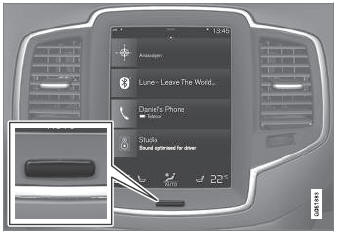
Кнопка «Центр дисплея».
When the home button is used, the screen will go dark and the touchscreen no longer reacts to touch. Климат -бар останется видимым. All functions connected to the screen continue to operate, such as climate, audio, guiding* and apps. The center display screen can be cleaned when the display is dimmed. The dimming function can also be used to darken the screen so it is not a distraction while driving.
- Press and hold the button beneath the screen.
- Экран будет темным (климатическая полоса останется видимой). All functions connected to the screen continue to operate.
- To reactivate the screen, briefly press the Home button.
- The view that was displayed before the screen was turned off will be displayed again.
* Опция/аксессуар.
Проверьте себя
Короткий тест по Volvo XC90: после ответа — пояснение и ссылка на страницу руководства.
Страница помогла?