Trip computer
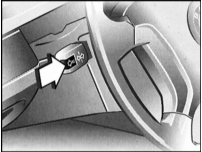
Recalling information
Once the ignition key is turned to position 1, you can use the turn signal lever to display trip computer information on the instrument cluster display. Each brief press of the lever toward the steering column displays the next item of information.
The display design may vary depending on your vehicle's equipment level.
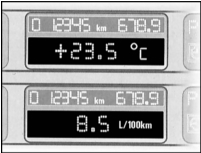
Outside air temperature and average fuel consumption
Once the ignition key is turned to position 1, the outside air temperature is always shown automatically. A brief press of the turn signal switch changes the display to average fuel consumption.
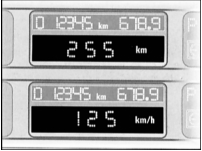
Driving range and average speed
After average fuel consumption, the display shows the estimated driving range, which is calculated based on your actual driving style over the last kilometers driven.
The next press of the turn signal switch displays the average speed. Time when the engine is off is not included in the calculations.
Clearing the display
If you briefly press the turn signal lever while the average speed is displayed, the trip computer information can be cleared from the display.
Pressing the CHECK button clears any trip computer display*. In this case, only messages from the self-diagnostic system will be shown.
Resetting the averages
If you hold the turn signal lever pressed, the currently displayed average fuel consumption and average speed values will be recalculated from zero. The engine must be running.
Test yourself
A quick BMW 1 quiz: every answer comes with an explanation and a link to the manual page.