Locking/Unlocking the Doors
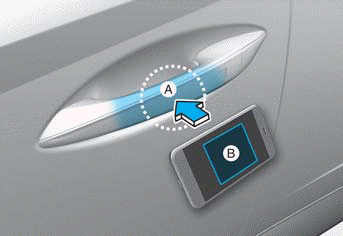
A: Door handle authentication panel
B: NFC antenna
To unlock:
Place the digital key (smartphone key) NFC antenna near the door handle authentication panel of the driver's or passenger's door for approximately 2 seconds.
If you unlock your vehicle from the passenger door handle, all doors will unlock. If you unlock your vehicle from the driver's door handle, only the driver's door or all doors will unlock depending on the two-press unlock function setting. Refer to User Settings to change the driver's door unlock mode.
Closing:
Place your digital key (smartphone key) near the door handle authentication pad of the driver's or passenger's door.
Before leaving the vehicle, make sure that your vehicle is locked. When using your Hyundai digital key on the front door handle, listen for the door lock operating, then pull the handle within 3 seconds to confirm that the doors are locked.
Information
- You cannot lock your vehicle if:
- The smart key is inside the vehicle.
- The ignition switch is in the ACC or ON position.
- Any door is open (except the tailgate).
- The vehicle battery is discharged. The warning buzzer sounds for approximately 3 seconds. Move the smartphone more than 4 inches away from the door handle sensor, then try again. - If the doors were unlocked using the Hyundai digital key and you try to lock the doors using the driver's door lock switch, the doors lock and then immediately unlock when any door is closed.
Test yourself
A quick Hyundai Tucson LM quiz: every answer comes with an explanation and a link to the manual page.