Starting the Engine
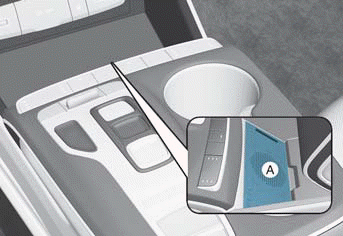
A: Vehicle Authentication Panel (wireless charging pad)
1. After placing your registered smartphone on the vehicle authentication pad (wireless charging pad), depress the brake pedal and press the engine START/STOP button.
2. After starting, the digital key data will be automatically updated for 5 to 20 seconds, then you can remove the smartphone from the pad.
Information
When locking or unlocking the doors with the Hyundai digital key after connecting or charging the vehicle battery, it may take longer than usual to identify the vehicle. Hold the smartphone near the door NFC sensor for several seconds or until the door lock is heard operating.
Note that if your vehicle is parked in an area with weak cellular coverage, the smartphone digital key may still be used a limited number of times to unlock and start the vehicle.
After starting the vehicle, it is recommended to leave your smartphone on the vehicle authentication pad (wireless charging pad) until the cellular service is stronger and digital key authentication is complete.
After authentication is completed, the wireless charging function is activated (the wireless charging indicator light comes on).
WARNING
Do not leave children unattended in the vehicle when using the Hyundai digital key to avoid serious injury or death. The engine may be started if the registered smartphone key or key card is placed on the vehicle authentication pad (wireless charging pad).
Always keep the registered digital key (smartphone key or key card) with you to prevent unintentional movement or theft when leaving the vehicle.
For more information, refer to the "Engine START/STOP Button" section in Chapter 6.
Test yourself
A quick Hyundai Tucson LM quiz: every answer comes with an explanation and a link to the manual page.