Display trip time (DT). Set clock and calendar
The trip time (DT) display and the option to set the clock and calendar complete the onboard electronics of the Kia Opirus. The intuitive operation via the central keypad allows quick adjustments, even during short stops. Whether for daily planning, long-distance journeys or service intervals, the precise time recording makes the system a useful companion in everyday use. The clear display provides easy orientation in the cockpit.
Display trip time (DT)
To switch to DT mode, briefly press the [TRIP] button on the keypad.
[Trip time display]
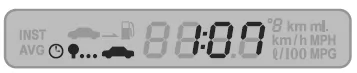 The number shown in the corresponding part of the display indicates the trip time up to the current moment.
- The trip time display range is 0:00 to 99:59. After the upper value is exceeded, the trip time starts again from 0:00.
- The trip time is displayed as '---' when the ignition is switched from OFF to ACC position.
 If the [RESET] button on the keypad is pressed for more than 1 second, the trip time is cleared (display 0:00) and measurement starts again from that moment.
Set clock and calendar
To set the clock and calendar, briefly press the [CLOCK MODE] button on the keypad.
[Clock display]
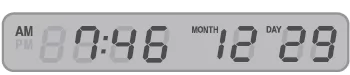 This function is always displayed when the ignition is switched to ACC position.
- Press the [CLOCK MODE] button to change the mode.
'HOUR'→'MINUTE'→'MONTH'→'DAY' are updated every 0.5 seconds.
- When the [CLOCK MODE] button is pressed, the digit of the time display that is currently flashing can be adjusted.
To set the time, use the [
 ] and [
 ] buttons on the keypad.
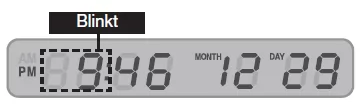 To set the minutes after setting the hours, press the [CLOCK MODE] button. Set the minutes the same way as the hours, using the [] and [].
- When the 'DAY' symbol flashes, press the [CLOCK MODE] button to finish the time setting and exit the setting mode.
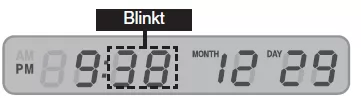 The setting mode is ended by pressing the [CLOCK MODE] button. The seconds always start at '0'.
- The other buttons have no function for 10 seconds after the [CLOCK MODE] button is pressed, until the setting mode is exited.
- If the [] and [] buttons on the keypad are pressed for more than 2 seconds, the function of the [] and [] buttons changes to the FAST COUNT mode.
The trip time and clock display of the Kia Opirus 2003–2011 is a practical feature that makes driving even more comfortable. The driver always has an overview of the time and can easily set it when needed.
The integrated calendar completes the functions and makes the trip computer of the Kia Opirus a valuable everyday helper.
FAQHow is the clock set in the Kia Opirus 2003–2011?
Hours, minutes and the date can be set using the [CLOCK MODE] button and the arrow buttons.
Is the trip time reset when the ignition is switched off?
Yes, when the ignition is switched off, the trip time display is reset.
Test yourself
A quick Kia Opirus quiz: every answer comes with an explanation and a link to the manual page.