Rear window antenna*. Operating the keypad. Displaying outside air temperature (OAT). Displaying distance to empty (DTE) with the current fuel level
The rear window antenna of the Kia Opirus is discreetly integrated into the rear window and activates automatically when the radio is switched on. This chapter also describes how to use the trip computer to display outside air temperature, driving range and other driving data. Important notes on cleaning agents and films protect the sensitive antenna elements. This keeps radio reception functioning clearly over the long term, even under heavy use.
Rear window antenna*
The rear window antenna is switched on automatically when the radio is switched on with the ignition on or in the ACC ignition switch position. The antenna is integrated into the rear window.
CAUTION- Do not clean the inside of the rear window with aggressive cleaning agents, and do not use scrapers, as these could damage the antenna elements.
- Do not attach sun-control films containing Ni, Cd, etc. to the rear window. This may impair radio reception.
USING THE TRIP COMPUTER

- TRIP button
- CLOCK MODE button
- ARROW button
 /

- CLOCK SET button
- RESET button
Operating the keypad
[TRIP] button
- Each time the [TRIP] button on the keypad is pressed, the trip computer mode changes as follows.
(OAT→DTE➟DD→AVS→AFC→ MFC→DT)
 Press and hold the [TRIP] button for longer than 1 second to turn off the display. The display turns back on when you press the [TRIP] or [RESET] button.
[RESET] button
 The [RESET] button initializes the data on all function levels. (Resetting the instantaneous fuel consumption is not supported.)
Displaying outside air temperature (OAT)
[RESET] button
[Outside air temperature display]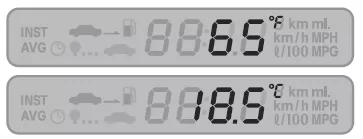
- The current outside air temperature is displayed.
- When switching from the ignition off position to the ACC ignition switch position, the current outside air temperature is displayed as '---C' or '---F'.
- Press the [RESET] button to switch between degrees Celsius (C) and degrees Fahrenheit (F), or vice versa.
[Outside air temperature display]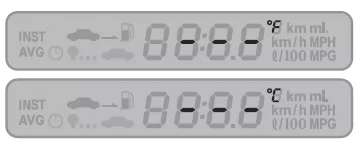
- When the vehicle speed exceeds 30 km/h, the displayed value increases by 1 degree every 90 seconds as the outside air temperature rises. Regardless of vehicle speed, the displayed value decreases by 1 degree every 2 seconds when the temperature falls (by 0.5 degrees in °C).
- The outside air temperature display can decrease while the vehicle is stopped, but it cannot increase.
NOTE
- The outside air temperature shown in the corresponding part of the display is indicated so that it is very close to the actual outside air temperature. However, the temperature display may show a higher value due to engine heat during long periods of driving at low speed.
Displaying distance to empty (DTE) with the current fuel level
To enter DTE mode, briefly press the [TRIP] button on the keypad.
[Distance to empty display with the current fuel level]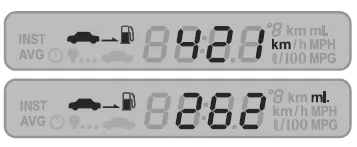
- The display shows the distance that can be driven with the current fuel supply.
- The distance to empty changes in steps of 1 km. When the value falls below 50 km, the '---' symbol flashes in the display.
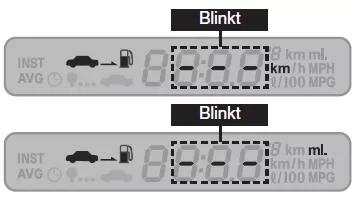 The distance to empty mode is shown as '---' when switching from the ignition off position to the ACC ignition switch position.
 'OFF' is displayed if the fuel tank sender is not connected.
 When the actual range decreases by 1 km, the distance to empty display may decrease by 2–4 km, depending on traffic conditions and driving style.
NOTE
- Please note that the distance to empty may vary depending on the driver's driving habits, traffic conditions and other factors.
- If the fuel tank sensor sends an incorrect value, a feedback algorithm can still calculate the accurate distance that can be driven.
- If the distance to empty display does not increase after refueling, stop the vehicle and press the [TRIP] and [RESET] buttons simultaneously for longer than 5 seconds to update the display.
The rear window antenna of the Kia Opirus 2003–2011 is integrated into the rear window and provides clear radio reception without disturbing elements on the vehicle. The trip computer also offers useful information such as outside air temperature, distance to empty or average fuel consumption.
Easy-to-use buttons make all functions simple to operate. This makes the Kia Opirus a vehicle that combines functionality and comfort at a high level.
FAQHow do you change the outside air temperature display on the Kia Opirus 2003–2011?
Press the [RESET] button to switch between degrees Celsius and Fahrenheit.
Why should the rear window not be cleaned with aggressive cleaning agents?
Because they could damage the antenna elements.
Test yourself
A quick Kia Opirus quiz: every answer comes with an explanation and a link to the manual page.