Show trip distance (DD). Show average speed (AVS). Show average fuel consumption (AFC) - not for Chinese models. Instantaneous
The trip computer in the Kia Opirus (2003–2012) provides comprehensive driving data: trip distance (DD), average speed (AVS), and average and instantaneous fuel consumption (AFC, MFC). The display is precise and designed around the driver's needs. The TRIP and RESET buttons allow you to reset individual values to zero. With continuous updates, driving style, consumption and efficiency can be monitored and optimized in real time, making it ideal for cost-conscious frequent drivers.
Show trip distance (DD)
To enter DD mode, briefly press the [TRIP] button on the button panel.
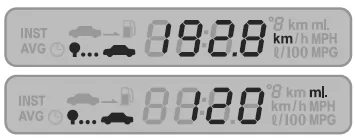 [Trip distance display]
- The display shows the distance traveled from the start of the trip up to the current point.
- The trip distance display range is 0 to 999.9 km. After that, the display changes to 0 km and begins measuring the trip distance anew from that moment.
- The trip distance is shown as '---' when switching from ignition OFF to the ACC ignition position.
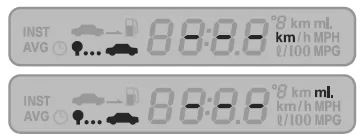 If the [RESET] button on the button panel is pressed for longer than 1 second, the current trip distance is erased (display 0 km) and the trip distance is measured anew from that moment.
- The total distance traveled is shown regardless of whether the ignition is on or off, and it is only reset to 0 when the [RESET] button is pressed.
NOTE
- When the trip distance increases by 1 km, the remaining possible driving range may decrease in steps of 2-3 km, depending on traffic conditions or fuel consumption.
Show average speed (AVS)
To enter AVS mode, briefly press the [TRIP] button on the button panel.
[Average speed display]
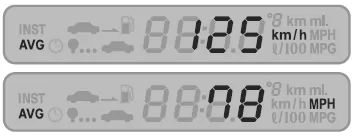 The average vehicle speed from when the ignition is switched on up to the current moment is shown in the corresponding part of the display.
- When the ignition is switched off, the average speed is reset to 0.
- The average speed is shown as '---' when switching from ignition OFF to the ACC ignition position.
- The average speed since the engine was last started is shown.
- The average speed display range is 0 to 250 km/h, and the value is updated once per second.
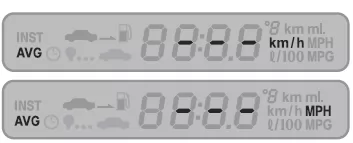 The average speed also includes the time the vehicle is stationary ( 0 km/h)
- If the [RESET] button on the button panel is pressed for longer than 1 second, the current average speed is erased (display 0 km) and the average speed is recalculated from that moment.
Show average fuel consumption (AFC) - not for Chinese models
To enter AFC mode, briefly press the [TRIP] button on the button panel.
[Average fuel consumption display]
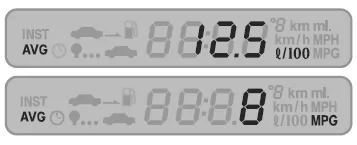 The number shown in the corresponding part of the display indicates the average fuel consumption.
- The average fuel consumption shown on the display is the consumption per 100 km.
- The average fuel consumption display range is 0.0 to 99.9 L/100 km, and the displayed value is updated once per second.
- If the [RESET] button on the button panel is pressed for longer than 1 second, the average fuel consumption is erased (display 0.0 L/100) and it is shown again after a distance of approx. 0.5 km has been driven.
- After the ignition is switched on again (at least to the ACC ignition position), the average fuel consumption is shown with its previous value.
- The average fuel consumption may rise if the trip is short compared with stationary periods, but the normal fuel consumption figure will be shown again once you continue driving.
Show instantaneous fuel consumption (MFC) - not for Chinese models
To enter MFC mode, briefly press the [TRIP] button on the button panel.
[Instantaneous fuel consumption display]
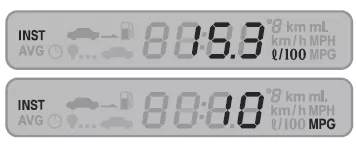 The instantaneous fuel consumption display range is 0.0 to 99.9 L/100 km, and the displayed value is updated every 2 seconds.
- The instantaneous fuel consumption is shown as '---' when switching from ignition OFF to the ACC ignition position.
- A high value indicates high fuel consumption on short trips, and a low value indicates low fuel consumption on long trips.
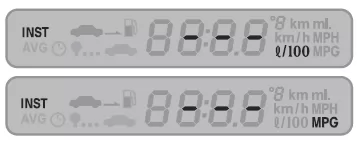 The instantaneous fuel consumption cannot be reset, and its value is updated every two seconds from when the ignition is switched on until it is switched off.
- If no fuel is consumed while driving, '---' L/100 is shown on the display.
The trip computer of the Kia Opirus 2003–2011 provides the driver with useful information such as trip distance, average speed and fuel consumption. This data helps optimize driving style and keep track of vehicle use.
All displays can be easily controlled with the operating buttons and reset when needed. In this way, the Kia Opirus supports the driver in efficient and safe driving.
The precise technology of this system reflects the high standards of quality and comfort in the Kia Opirus 2003–2011.
Test yourself
A quick Kia Opirus quiz: every answer comes with an explanation and a link to the manual page.