Folder Random
press key
![F.RDM] through the](/kia-sorento/images/books/3/1/page.h323.gif) Select [
 F.RDM] using the
 TUNE knob or
 key to play songs randomly within the
current folder.
❈ Press the F.RDM key again to cancel.
Folder Repeat
press key
![F.RPT] through the](/kia-sorento/images/books/3/1/page.h328.gif) Select [
 F.RPT] using the
 TUNE knob or
 key to repeat songs in the current
folder.
❈ Press the F.RPT key again to cancel.
All Random
press key
![A.RDM] through the](/kia-sorento/images/books/3/1/page.h333.gif) Select [
 A.RDM] using the
 TUNE knob or
 key to play all songs randomly within the
CD.
❈ Press the A.RDM key again to cancel.
Information
press key
![Info] through the](/kia-sorento/images/books/3/1/page.h338.gif) Select [
 Information] using the
 TUNE knob or
 key to display information about the
current song.
❈ Press the Press the
key to turn off the information display.
Copy
press
key![Copy] through the](/kia-sorento/images/books/3/1/page.h344.gif) Select [
 Copy] using the
 TUNE knob or
 key.
Used to copy the current song to My Music. You can play copied music in My Music mode.
❈ If another key is pressed during copying, a prompt to cancel copying is displayed.
❈ If another media (USB, CD, iPod®, AUX) is connected or inserted during copying, copying is cancelled.
❈ Music will not play during copying.
Menu: iPod®
In iPod® mode, press the key to set repeat, random, information
and search functions.
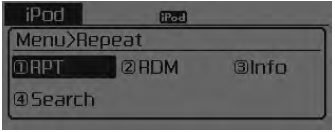
Repeat
press key
![RPT] through the](/kia-sorento/images/books/3/1/page.h351.gif) Select [
 RPT] using the
 TUNE knob or
 button to repeat the current song.
❈ Press RPT again to cancel repeat.
All Random
press
key![RDM] through the](/kia-sorento/images/books/3/1/page.h356.gif) Select [
 RDM] using the
 TUNE knob or
 key.
Plays all songs in the currently playing category in random order.
❈ Press the RDM key again to cancel.
Information
press key
![Info] through the](/kia-sorento/images/books/3/1/page.h361.gif) Select [
 Information] using the
 TUNE knob or
 key.
Displays information about the current song.
❈ Press the Press the key to turn off the information display.
Search
press
key![Search] through the TUNE knob](/kia-sorento/images/books/3/1/page.h367.gif) Press the [
![Search] through the TUNE knob](/kia-sorento/images/books/3/1/page.h368.gif)
Search] using the TUNE knob
or key.
Displays the iPod® category list.
❈ Search by iPod® category key pressed, returns to the parent category.
Test yourself
A quick Kia Sorento Owner's Manual quiz: every answer comes with an explanation and a link to the manual page.