Kia Sorento XM Owner's Manual.
Phone
In this manual: Kia Sorento XM Owner's Manual.
~1min read
Before using Bluetooth® Wireless Technology phone functions
- To use a Bluetooth® Wireless Technology phone, you must first pair and connect your mobile phone with Bluetooth® Wireless Technology.
- If the mobile phone is not paired or connected, Phone mode cannot be entered. Once the phone is paired or connected, the navigation screen will be displayed.
- If priority is set when the ignition is turned on (IGN/ACC ON), the Bluetooth® Wireless Technology phone will be connected automatically. Even if you are outside, a Bluetooth® Wireless Technology phone will be connected automatically as soon as it is in the immediate vicinity of the vehicle. If you do not want to connect to a Bluetooth® Wireless Technology phone automatically, turn the Bluetooth® Wireless Technology power OFF.
Making a call using the steering wheel controls
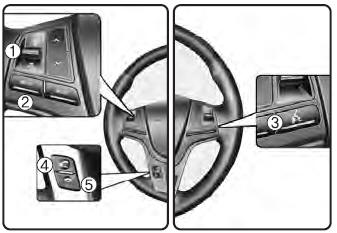
(1) VOLUME button:
Raises or lowers the speaker volume.
(2) Mute button:
Mutes the microphone during a call.
(3) 
button:
Activates voice recognition.
(4)  button
:
Places and transfers calls.
(5)  button
:
Ends a call or cancels functions.
Checking the Call History and Calling
➀ Briefly press (less than 0.8 seconds) the steering wheel key
remote control.
➁ The call history list will appear on the screen.
➂ Press the
Press the key again to connect the call to the selected number.
Redialing the Last Number Dialed
➀ Press and hold (more than 0.8 seconds) the
steering wheel key remote control.
➁ The last number dialed is redialed.
Test yourself
A quick Kia Sorento Owner's Manual quiz: every answer comes with an explanation and a link to the manual page.
Was this page helpful?