Clock Settings
Press the key Select
[Clock] using the knob TUNE or the button
 or the button
 Select the menu using the
knob TUNE
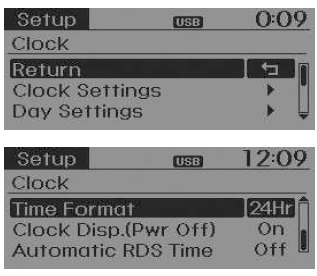
Clock Settings
This menu is used to set the time.
Select [Clock Settings] *Set using the knob TUNE
 Press the knob
 TUNE
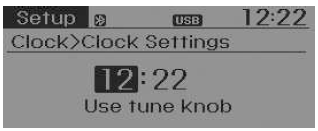
❈ Adjust the highlighted number to set the [hour], then press the TUNE knob to set the [minute].
Day Settings
This menu is used to set the date (DD/MM/YYYY).
Select [Day Settings]Set using the knob 
TUNEPress the knob  TUNE
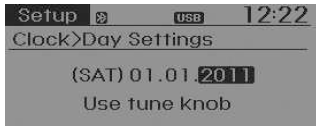
❈ Adjust the highlighted number to make the setting, then press the TUNE knob to move to the next setting. (Set in the order Day/Month/Year)
Time Format
This function is used to set the audio system's 12-hour/24-hour time format.
Select [Time Format]Set 12Hr / 24Hr using
the knob TUNE
Clock display when power is off
Select [Clock Disp.(Pwr Off)] Set

/ using the
knob TUNE
 : Displays the time/
date on screen : Off.
Automatic RDS Time
This option is used to set the time automatically by synchronizing with RDS.
Select [Automatic RDS Time] Set using the TUNE knob /
 using the
knob TUNE
 : Turns on Automatic
RDS Time : Off.
Test yourself
A quick Kia Rio YB quiz: every answer comes with an explanation and a link to the manual page.