Basic operation: USB / iPod
Press the button , to change
modes in the order USB (iPod) ➟ AUX.
❈ After connecting a USB device, music plays automatically.
❈ If no external device is connected, "No Media" appears on the display for 5 seconds and the display returns to the previous mode.
Repeat
While a track (file) is playing, the key (RPT)
USB, iPod mode: RPT is shown on the display
- To repeat a single track: briefly press the key (less than 0.8 seconds). The currently playing track is repeated.
USB mode: shown on the display
- To repeat a folder: press and hold the key (more than 0.8 seconds). All files in the current folder are repeated.
 , to
cancel repeat
Random
While a track (file) is playing, the key (RDM)
USB mode: RDM is shown on the display
- Folder Random: briefly press the key (less than 0.8 seconds) to play all files in the current folder in random order.
USB mode: A.RDM is shown on the display
- All Random: press and hold the key (more than 0.8 seconds) to play all files in random order.
iPod mode: A.RDM is shown on the display
- Album Random: briefly press the key (less than 0.8 seconds) to play all songs in the albums of the current category in random order.
iPod mode: A.RDM is shown on the display
- All Random: press and hold the key (more than 0.8 seconds) to play all songs in the current category in random order.
 to
cancel.
Changing between songs/files
While a track (file) is playing, the key

- Briefly press the key (less than 0.8 seconds): the current track restarts from the beginning.
 If this key is
pressed again within 1 second, the previous track will play.
While a track (file) is playing, the key
- Briefly press the key (less than 0.8 seconds): the next track plays.
- Press and hold the key (more than 0.8 seconds): the track is skipped forward.
SCAN: USB mode
While a track (file) is playing, the key
Scans all tracks, starting with the next one, each for 10 seconds.
❈ Press the key again to
cancel.
❈ The SCAN function is not supported in iPod mode.
Browsing folders: USB mode
While a file is playing, the key (Folder up)
- Moves to the parent folder of the current folder.
While a file is playing, the key (Folder down)
- Searches the subfolder of the current folder.
❈ If a folder is selected by pressing the TUNE knob, the first file in the selected folder will play.
File Search
- Turn the knob

TUNE: Allows file search. - Press the knob

TUNE: Plays the selected file.
MENU: iPod mode
While a file is playing, the key
 (MENU)
Enters category search mode.
Moves to the next higher-level list each time the key is pressed.
Information
While a file is playing, the key (INFO)
Displays information about the current file in the following order
- USB mode: FILE NAME ➟ TITLE ➟ ARTIST ➟ ALBUM ➟ FOLDER ➟ TOTAL FILE
- iPod mode: TITLE ➟ ARTIST ➟ ALBUM ➟ TOTAL FILE
AUX
This function is used to play EXTERNAL devices currently connected to the AUX jack. AUX mode starts automatically as soon as an external device is connected. If an external device is already connected, you can also press the MEDIA key to switch to AUX mode.

❈ AUX mode cannot be started if the device cable plug is not connected to the AUX jack.
NOTE ON USING THE AUX JACK
- To use AUX mode, insert the cable plug into the AUX jack.
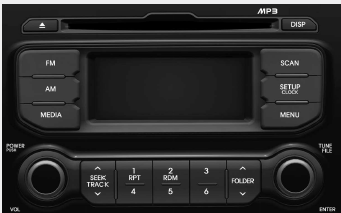
AM100IHEE
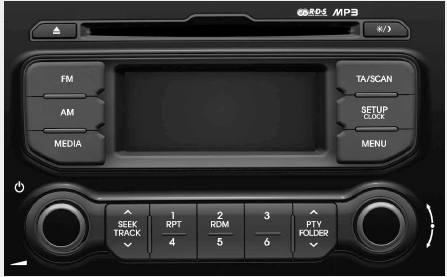
AM110IHEE
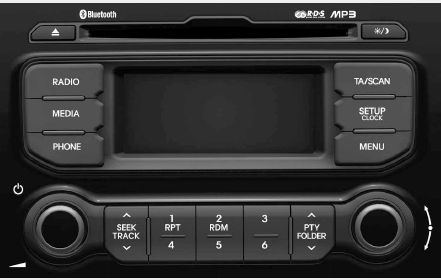
❋ If Bluetooth Wireless Technology is not supported, no logo will be displayed .
AM100IHEG
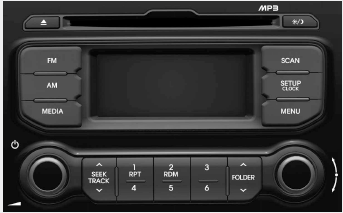
AM110IHEG
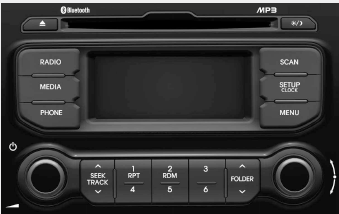
AM100IHGG
AM110IHGG
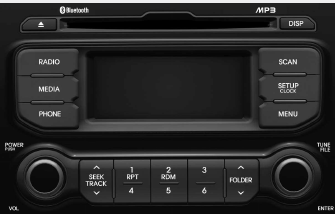
❋ If Bluetooth Wireless Technology is not supported, no logo will be displayed .
Test yourself
A quick Kia Rio YB quiz: every answer comes with an explanation and a link to the manual page.