Phone
Before using the Bluetooth® Wireless Technology phone features
- To use Bluetooth® Wireless Technology phone, you must first pair and connect your Bluetooth® Wireless Technology mobile phone.
- If the mobile phone is not paired or connected, it is not possible to enter Phone mode.
Making a phone call using the steering wheel remote control
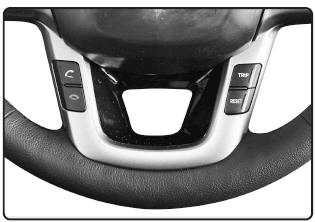
- Checking the call history and making a phone call
- Briefly press (less than 0.8 seconds) the
 steering wheel remote control
button. - The call history will be displayed on the screen.
- Press the
 button again to
call the selected number.
- Redialing the last number called
- Press and hold (more than 0.8 seconds) the
 steering wheel
remote control button. - The last number called has been redialed.
❈ If there is no call history, a screen asking whether to download the call history will be displayed.
(The download function may not be supported for some mobile phones)
Phone MENU
Press the key to display the three menus (Call History, Phone Book, Phone Setup).
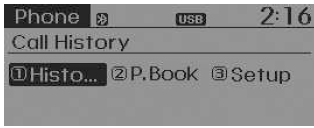
Call history
Press the key Set [1
Call History] using the TUNE knob. TUNE or the button
 .
The call history is displayed and can be used to select a number and make a phone call.
If there is no call history, a screen asking whether to download the call history will be displayed.
(The download function may not be supported for some mobile phones)
Contacts
Press the key Set [2
Phone Book] using the TUNE knob. TUNE or the button
 .
Contacts are displayed and can be used to select a number and make a phone call.
❈ If more than one number is saved under a single contact, a screen showing the mobile, home and office numbers will be displayed. Select the desired number to make the call.
❈ If there are no contacts, a screen asking whether to download contacts will be displayed. (The contact download function may not be supported for some mobile phones)
Phone setup
Press the key Set [3
Phone Setup] using the TUNE knob or the key.
The Bluetooth® Wireless Technology phone setup screen will be displayed. For more information, refer to "Phone setup".
Test yourself
A quick Kia Rio YB quiz: every answer comes with an explanation and a link to the manual page.