Adjustable Speed Limiter
The adjustable speed limiter is a function that limits the vehicle speed to the speed set in the system. The vehicle speed is controlled to remain below the set value, even if the accelerator pedal is depressed.
The speed that can be set for the adjustable speed limiter ranges from 30 to 200 km/h. The vehicle speed may exceed the set value when the vehicle is descending a slope; however, the driver is notified by a flashing display and an audible warning.
WARNING
Always turn the system off if someone else gets behind the wheel: If the driver changes and the new driver has not been informed about the speed limiter function, the vehicle may not accelerate when the accelerator pedal is pressed, which may lead to an accident.
The system consists of the adjustable speed limiter display and the adjustable speed limiter button on the steering wheel.
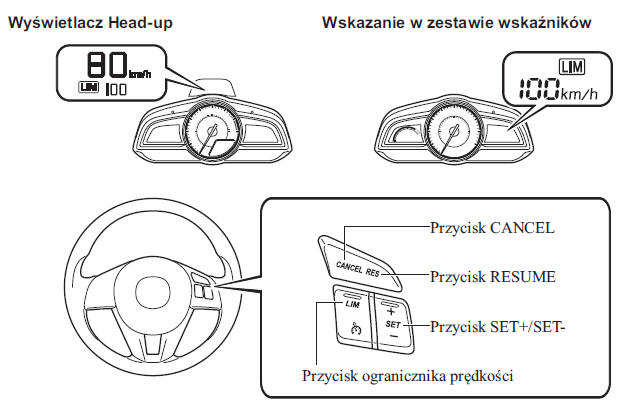
Adjustable speed limiter display
The status of the adjustable speed limiter settings is shown on the Head-up Display or on the multi-information display in the instrument cluster.
Standby mode display
Illuminates when the adjustable speed limiter button is pressed and the system is turned on.
Goes off when the system is turned off.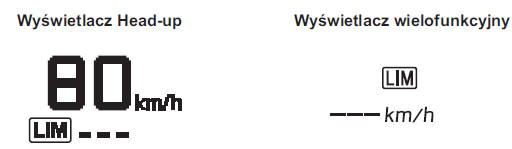
Setting display
Illuminates when the SET + /SET - button is pressed and a speed is set.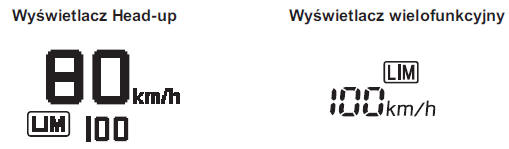
Cancellation display
Illuminates when one of the following actions is performed and the system is temporarily cancelled.
- The CANCEL button is pressed
- The accelerator pedal is fully depressed

Adjustable speed limiter main indicator light (orange) / Adjustable speed limiter set indicator light (green)
The indicator light can show two colors.
Adjustable speed limiter main indicator light (orange)
This indicator light illuminates orange when the adjustable speed limiter button is pressed and the adjustable speed limiter is activated.
Adjustable speed limiter set indicator light (green)
This light illuminates green when a driving speed has been set.
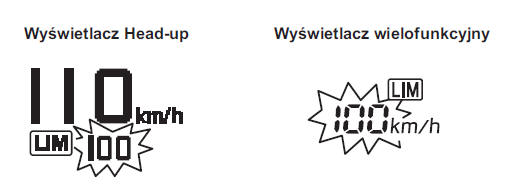
Adjustable speed limiter warning signal
If the vehicle speed exceeds the set speed by approximately 3 km/h or more, a continuous warning sound is emitted and the adjustable speed limiter display flashes at the same time. The warning sound will continue and the display will keep flashing until the vehicle speed is reduced to the set speed or lower.
Check that the surroundings are safe and adjust the vehicle speed by depressing the brake pedal. Also keep a safe distance from the vehicle ahead of your vehicle.
CAUTION
If you set a speed lower than the current vehicle speed by pressing the SET - or RES button, the warning signal will not activate for approximately 30 seconds, even if the vehicle speed is 3 km/h higher than the newly set speed.
Be careful not to exceed the set speed.
CAUTION
If the system is temporarily cancelled by fully depressing the accelerator pedal, the cancellation display appears on the adjustable speed limiter display. If the vehicle speed exceeds the set speed by approximately 3 km/h or more while the cancellation display is shown, the set speed display flashes but no warning signal is emitted.
Turning the System On/Off
Press the speed limiter button to turn on the system. The adjustable speed limiter display appears.
To turn off the system, press the speed limiter button while the adjustable speed limiter display is shown. The adjustable speed limiter display turns off.
Setting the system
WARNING
Before setting the adjustable speed limiter, always check that the surroundings are safe: If you set a speed lower than the current vehicle speed, the vehicle decelerates to the set speed. Check that the surroundings are safe and keep a safe distance from vehicles ahead and behind.
1. Press the speed limiter button to turn on the system.
2. To set the speed, press the SET+ or SET- button. If the current vehicle speed is 30 km/h or higher, the set speed is set to the current vehicle speed. If the current vehicle speed is lower than 30 km/h, the set speed is set to 30 km/h.
3. To increase the set speed, press and hold the SET+ button. The speed will increase in steps of 10 km/h. The speed can also be set in steps of 1 km/h by pressing and immediately releasing the SET+ button. For example, the set speed will increase by 4 km/h if you press the SET+ button four times.
4. To decrease the set speed, press and hold the SET- button. The speed can be decreased in steps of 10 km/h. The speed can also be set in steps of 1 km/h by pressing and immediately releasing the SET- button. For example, the set speed will decrease by 4 km/h if you press the SET- button four times.
CAUTION
This system does not operate when cruise control is switched on.
The system is temporarily disabled when accelerating the vehicle by fully depressing the accelerator pedal; however, its operation resumes as soon as the vehicle speed drops to the set speed or lower.
The vehicle speed may exceed the set value when descending a slope.
Temporary cancellation of the system
The system is temporarily cancelled (standby mode) when one of the following actions is performed while the adjustable speed limiter display is shown.
- The CANCEL button is pressed
- The accelerator pedal is fully depressed
Press the RESUME button to return to the previously set speed. The adjustable speed limiter display remains shown.
CAUTION
The speed can be set by pressing the SET + or SET - buttons while the system is in standby mode.
The adjustable speed limiter is not cancelled by pressing the brake pedal.
Test yourself
A quick Mazda 2 quiz: every answer comes with an explanation and a link to the manual page.