Lane Departure Warning System (LDWS)
The Lane Departure Warning System (LDWS) warns the driver when the vehicle may depart from the lane in which it is traveling.
Using a camera that monitors the area ahead of the vehicle (FSC camera), this system recognizes white or yellow lane lines. When it determines that the vehicle may depart from its lane, it alerts the driver with a message on the Active Driving Display (on vehicles equipped with the Active Driving Display), and with the flashing LDWS warning light and an LDWS warning sound.
Use the LDWS when driving on roads with white or yellow lane lines.
See section "Forward Sensing Camera (FSC)" on page 4-134.
Use the LDWS when driving on roads with white or yellow lane lines.
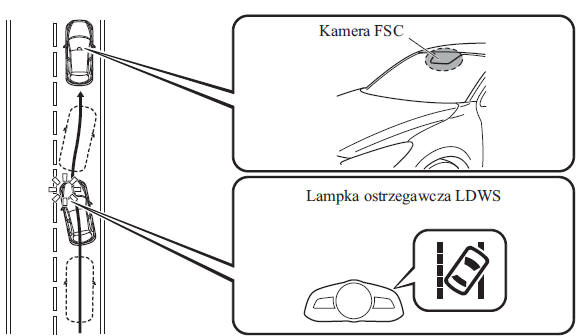
The warning light illuminates when a malfunction occurs in the system.
See the section "Warning and Indicator Lights" on page 4-41.
WARNING
Do not use the LDWS in the following situations. Depending on the current road conditions, the system may not operate correctly, which may lead to an accident.
- Driving on roads with sharp bends
- Driving in adverse weather conditions (rain, fog and snow).
The operation of the LDWS may be limited: Always keep the vehicle on course using the steering wheel and drive carefully. The system is not designed to relieve the driver of the need to pay attention, and relying solely on the LDWS may lead to an accident. The driver is responsible for changing lanes correctly and for all other maneuvers. Always pay attention to the direction in which the vehicle is traveling and to the entire surroundings of the vehicle.
CAUTION
Do not modify the suspension. If the vehicle height or the damping level of the suspension is changed, the LDWS may not operate correctly.
CAUTION
The LDWS operates, sounding a warning and illuminating the warning light, when the vehicle you are driving drifts out of its lane. Steer the steering wheel appropriately to keep the vehicle centered in the lane.
When the turn signal lever is operated to change lanes, the LDWS warnings are automatically canceled. The LDWS resumes operation when the turn signal lever returns to its original position and the system detects white or yellow lane lines.
If the steering wheel is moved suddenly, or the accelerator or brake pedal is pressed, causing the vehicle to approach a white or yellow line, the system recognizes that the driver is changing lanes and the LDWS warnings are automatically canceled.
The LDWS may not activate immediately after the vehicle drifts out of its lane, even when the LDWS is in standby mode, or when the vehicle suddenly drifts out of its lane within a short period of time.
The LDWS does not operate if it does not recognize the white or yellow lane lines marking the lane.
In the following situations, the LDWS may be unable to correctly detect the white or yellow lane lines marking the lane, and the LDWS may not operate correctly.
Heavy luggage is placed in the luggage compartment or on the rear seat, and the vehicle is tilted.
The tire pressure is not adjusted to the values specified on the tire pressure label.
When the vehicle is driving on toll plaza exit and entry ramps or on highway parking areas.
White or yellow lines are hard to see due to dirt or worn paint.
The vehicle ahead is driving close to the white or yellow line, making it less visible.
The white or yellow line is less visible due to bad weather (rain, fog or snow).
The vehicle is driving between temporary lines or on a section closed due to road works.
The road has markings that may mislead the system, such as temporary lines from a change in traffic layout, shadows, lingering snow, or water-filled grooves.
Light intensity changes suddenly, for example when entering or leaving a tunnel.
The light output from the headlights is reduced due to dirt or a fault in the optical system.
The windshield is dirty or fogged.
The taillights of the vehicle ahead are reflected on the road surface.
The road surface is wet and shiny after rain, or there are puddles on it.
Shadows from guardrails running parallel to a white or yellow line fall on the road.
The lane is unusually narrow or wide.
The road surface is excessively uneven.
The vehicle is jolted when driving over a speed bump.
There are two or more adjacent white or yellow lines.
Road markings of various shapes are painted on the road near intersections.
When the System Operates
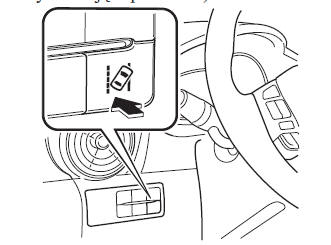
1. The system enters standby mode when the LDWS switch is pressed. The LDWS OFF indicator light in the instrument cluster then goes out.
On vehicles equipped with the Active Driving Display, the driving lane (lane boundary lines) is shown on the display.
Display indication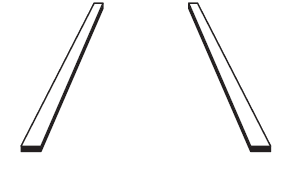
2. Drive in the center of the lane with the LDWS OFF indicator light off. The system will operate when all of the following conditions are met:
- The vehicle is driving in the center of the lane with a white or yellow line on the right, on the left, or on both sides.
- The vehicle speed is 70 km/h or higher.
- The vehicle is driving on a straight road or a road with gentle curves.
On vehicles equipped with the Active Driving Display, the driving lane is shown on the display.
Display indication
The LDWS does not operate in the following cases:
- The system cannot detect white or yellow lines.
- The vehicle speed is lower than 65 km/h.
- The vehicle is taking a sharp curve.
- The vehicle is taking a curve at an inappropriate speed.
CAUTION
The LDWS does not operate until it detects a white or yellow line on the left or right side.
If the system detects a white or yellow line on one side only, warnings are given only when the vehicle drifts toward that side.
The distance and the sensitivity of the warnings (that is, the likelihood of warnings being issued), which the system uses to determine the possibility of leaving the lane, can be changed.
See the "Customizable Features" section on page 9-13.
Automatic deactivation
In the following cases the LDWS is deactivated automatically and the LDWS warning light in the instrument cluster illuminates.
On vehicles equipped with the Head-up Display, the lane (lane boundary lines) is shown on the display. The LDWS is activated automatically when the conditions for its operation are met. The LDWS warning light then goes out.
- The camera temperature is too high or too low.
- The windshield around the camera is fogged.
- An obstruction in front of the camera that reduces forward visibility has been detected.
Automatic deactivation warning
If the following actions are performed, the LDWS determines that the driver intends to change lanes, and the LDWS warning is automatically cancelled. The LDWS is automatically reactivated once the driver has performed this action.
- The steering wheel is turned abruptly.
- The brake pedal is pressed abruptly.
- The accelerator pedal is pressed abruptly.
- The turn signal lever is operated (after the lever returns to its position, the LDWS may not operate for about 3 seconds, which is the time needed to select a lane).
CAUTION
About 60 seconds after the turn signal lever is operated, LDWS warnings may be issued if the vehicle is close to a white or yellow line.
Deactivating the system
Press the LDWS switch to turn off the system. The LDWS OFF indicator light will illuminate.
On vehicles equipped with the Head-up Display, the lane indication is not shown on the display when the LDWS is turned off.
LDWS warnings
If the system determines that the vehicle may leave its lane, an LDWS warning signal is generated and the LDWS warning light flashes. Turn the steering wheel appropriately and position the vehicle in the center of the lane.
On vehicles equipped with the Head-up Display, if the vehicle may leave its lane, the system determines the direction of travel and indicates it on the Head-up Display.
Display indication
CAUTION
If the LDWS warning signal is set to alarm, a sound will be heard from the vehicle speakers on the side toward which the system determines the vehicle may drift out of its lane.
Under certain conditions, for example high ambient noise, the LDWS warning signal may be difficult to hear.
The type of LDWS warning signal and its volume can be changed.
See the "Customizable Features" section on page 9-13.
Test yourself
A quick Mazda 2 quiz: every answer comes with an explanation and a link to the manual page.