Audio System Precautions
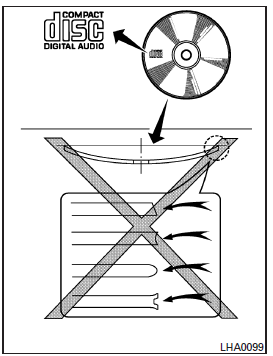
CD Player
WARNING
- Do not force a CD into the CD player or CD changer slot. You could damage the disc and/or the CD changer or CD player.
- Do not attempt to insert a CD when the loading door is closed, as you could damage the disc or the CD changer.
- You can load only one CD at a time into the player.
- Use only high-quality, 12 cm (4.7 in) round CDs identified by the "COMPACT disc DIGITAL AUDIO" logo on the disc or packaging.
- In cold or humid weather, the player may malfunction due to moisture in the air. If this occurs, remove the CD from the player and dehumidify or air out the player.
- The player may skip tracks when driving on a bumpy road.
- The CD player may not operate when the cabin temperature is very high or very low. Allow the cabin to cool or warm up before using the player.
- Do not expose the CD directly to sunlight.
- CDs that are damaged, dirty, scratched, or covered with fingerprints may not play properly.
- The following CDs may not play properly:
- Copy-protected CDs (CCCD)
- Recordable CDs (CD-R)
- Rewritable CDs (CD-RW)
- Do not use the following discs, as they may cause a CD player malfunction:
- 8 cm (3.1 in) CDs with an adapter
- CDs that are not round
- CDs with a paper label
- CDs that are warped, scratched or have irregular edges
- This audio system is designed only for playing pre-recorded CDs. It is not designed for burning CDs.
- If the CD cannot be played, one of the following messages is displayed.
CHECK DISC:
- Make sure the CD is inserted correctly (label facing up, etc.).
- Make sure the CD is not bent, warped or scratched.
PRESS EJECT:
This error is caused by excessive temperature inside the player.
Remove the CD by pressing the eject button. Reinsert the CD after a short time. The CD can be played when the temperature returns to normal.
UNPLAYABLE:
This audio system cannot play this type of file (MP3 or WMA CDs only [depending on equipment]).
Compact discs with MP3 or WMA (depending on equipment)
Terms:
- MP3 - MP3 is the short form of MPEG-1 Audio Layer 3. MP3 is the best-known compressed digital audio file format. This format offers quality close to that of a CD, at a fraction of the file size of standard audio files.
Converting a track or audio file from a CD-ROM to MP3 can reduce the file size by a ratio of about 10:1 without any noticeable loss of quality. MP3 compression removes redundant and inaudible parts of the sound signal that the human ear cannot hear.
- WMA - Windows Media Audio (WMA)* is a compressed audio format created by Microsoft as an alternative to the MP3 format. The WMA codec offers better file compression than the MP3 codec, allowing more audio tracks to be stored in the same space as MP3 files at the same quality.
- Bit rate - The bit rate indicates the number of bits per second used by a digital music file. The file size and quality of a compressed audio file are determined by the encoding bit rate of the file.
- Sampling rate - The sampling rate is the number of samples per second taken when converting an analog signal to digital (A-D conversion).
- Multisession - This is one of the methods used to record data on a medium. A single-session disc is written in one pass, while a multisession disc is written in several passes.
- ID3 or WMA tag - The ID3 or WMA tag is part of the encoded MP3 or WMA file and contains data about the digital music file, such as the track title, artist name, encoding bit rate, track length, etc.
The ID3 tag data is shown on the Artist name and track title line of the display.
*Windows® and Windows Media® are registered trademarks or trademarks of Microsoft Corporation in the United States and/or other countries.

Playback order table
Playback order:
The playback order of a CD containing MP3 or WMA files is as shown.
- The names of folders that do not contain MP3 or WMA files are not displayed.
- If there is a file at the top level of the disc, "ROOT FOLDER" is displayed.
- The playback order is the order in which the files were written by the writing software. For this reason, files may not play in the desired order.
Specifications table:
| Supported discs | CD, CD-R, CD-RW | ||
| Supported file systems | ISO 9660 LEVEL 1, ISO 9660 LEVEL 2, Apple ISO, Romeo, Joliet * ISO 9660 level 3 (packet writing) is not supported. | ||
| Supported versions*1 | MP3 | Version | MPEG1, MPEG2, MPEG2.5 |
| Sampling rate | 8 kHz to 48 kHz | ||
| Bit rate | 8 kbps to 320 kbps, variable | ||
| WMA | Version | WMA7, WMA8, WMA9 | |
| Sampling rate | 32 kHz to 48 kHz | ||
| Bit rate | 48 kbps to 192 kbps, variable | ||
| Tag data | ID3 tag VER1.0, VER1.1, VER2.2, VER2.3 (MP3 only) | ||
| Folder levels | Folder levels: 8, maximum number of folders: 255 (including the root folder), files: 512 (maximum of 255 files per folder) | ||
| Text character limit | 128 characters | ||
| Displayable character codes*2 | 01: ASCII, 02: ISO-8859-1, 03: UNICODE (UTF-16 BOM Big Endian), 04: UNICODE (UTF-16 Non-BOM Big Endian), 05: UNICODE (UTF-8), 06: UNICODE (Non-UTF-16 BOM Little Endian) | ||
*1 Files created with a combination of 48 kHz sampling rate and 64 kbps bit rate cannot be played.
*2 Available codes depend on the media, versions and the information to be displayed.
Troubleshooting guide:
| Symptom | Cause and Corrective Action |
| Playback not possible | Check whether the disc has been inserted correctly. |
| Check whether the disc is scratched or dirty. | |
| Check for condensation in the player. If there is condensation, wait until it has evaporated (about 1 hour) before using the player. | |
| If the error is caused by a temperature rise, the CD player will operate normally once the temperature returns to normal. | |
| If the CD contains both music CD files (CD-DA data) and MP3 or WMA files, only the music CD files (CD-DA data) are played. | |
| Files with extensions other than ".MP3", ".WMA", ".mp3" or ".wma" cannot be played. In addition, the character codes and the number of characters per folder name and file name must comply with the standards. | |
| Check whether the disc has been finalized or the session has been closed. | |
| Check whether the disc is copy-protected. | |
| Poor sound quality | Check whether the disc is scratched or dirty. |
| The bit rate may be too low. | |
| It takes a relatively long time before the music starts. | If there are many folders or file levels on the MP3/WMA disc, or if it is a multi-session disc, it may take some time before playback starts. |
| Music is interrupted or some passages are skipped | The writing software and hardware combination does not match, or the writing speed, writing depth, writing duration, etc. are not compatible. |
USB (Universal Serial Bus) memory (if equipped)
WARNING
Do not connect, disconnect or operate the USB device while driving. Doing so may be a source of distraction.
If you are distracted, you could lose control of your vehicle and cause an accident or serious injury.
WARNING
- Do not apply force to the USB device when inserting it into the USB port. If you insert the USB device crooked or upside down into the port, you may damage the port. Make sure the USB device is properly connected to the USB port.
- Do not grip the USB port cover (if equipped) when pulling the USB device out of the port. You could damage the port and the cover.
- Do not leave the USB cable where it could be pulled accidentally. If you pull on the cable, you may damage the port.
The vehicle is not equipped with a USB device.
USB devices must be purchased separately if required.
This system cannot be used to format USB devices. To format a USB device, use a personal computer.
For regulatory reasons, in some states or regions, the USB device for the front seats only plays audio without displaying images, even when the vehicle is parked.
This system is compatible with various USB memory devices, USB hard drives and iPod® players. Some USB devices may not be supported by this system.
- USB devices with multiple partitions may not be read correctly.
- Some characters used in other languages (Chinese or Japanese, for example) may not display correctly on the screen. It is recommended to use English characters with USB devices.
General notes on using USB devices:
- Refer to the device manufacturer's owner's guide for proper use and care of the device.
Notes on using the iPod®:
iPod® is a trademark of Apple Inc., registered in the United States and other countries.
- If the iPod® is connected incorrectly, a check mark flashes. Always make sure the iPod® is connected properly.
- The iPod® nano (1st generation) may remain in fast-forward or fast-reverse mode if it is connected while in search mode.
If this occurs, reset the iPod® manually.
- The iPod® nano (2nd generation) goes into fast-forward or fast-reverse mode if it is disconnected while in search mode.
- If the playback mode of the iPod® nano (2nd generation) is changed, an incorrect track title may be displayed.
- Audiobooks may not play in the same order as displayed on the iPod®.
- Large video files slow down the iPod®. As a result, the vehicle's center display may temporarily darken, but this is only for a short time.
- If an iPod® automatically selects large video files while in shuffle mode, the vehicle's center display may temporarily darken, but this is only for a short time.
Bluetooth® Audio
- Some Bluetooth® audio devices may not be recognized by the vehicle's audio system.
- The wireless connection between the compatible Bluetooth® audio device and the vehicle's Bluetooth® module must be set up before using the Bluetooth® audio function.
- Operation of the Bluetooth® audio device varies depending on the device model.
Make sure you know how to operate your audio device before using it with this system.
- The Bluetooth® audio device may stop under the following conditions:
- Receiving a call using the hands-free phone system.
- Checking the hands-free phone connection.
- Do not place the Bluetooth® audio device in an area surrounded by metal or far from the vehicle's Bluetooth® module, to maintain sound quality and prevent wireless connection interruptions.
- When an audio device is connected using Bluetooth® wireless technology, the device's battery may drain faster than usual.
- This system supports the Advanced Audio Distribution Profile (A2DP) and Audio/Video Remote Control Profile (AVRCP) for Bluetooth®.
 The Bluetooth® word mark is
a registered trademark of Bluetooth SIG, Inc.
and is used under license by Visteon.
Test yourself
A quick Nissan Altima quiz: every answer comes with an explanation and a link to the manual page.