Smart Key System
Specifications
Specifications
Smart Key
| Component | SPECIFICATIONS |
| rated voltage | 12 V DC |
| Operating voltage | 9 - 16 V DC |
| Operating temperature | (-35 to 75 °C) |
| motor load | Maximum 4 mA (with welcome indicator off) |
Wheel Receiver
| Component | SPECIFICATIONS |
| Frequency | 433.92 MHz |
| Antenna type | FSK (Frequency Shift Keying) |
SMART KEY REMOTE CONTROL
| Component | SPECIFICATIONS |
| BATTERY | Lithium Battery 3 V, 1 pc. |
| Range | - Distance at which the FOB RF (radio frequency) receiver can receive the signal: 30 m - Distance at which the FOB can receive the broadcast signal from the LF (low frequency) antenna (exterior handle/luggage compartment/tailgate): 0.7 m |
| battery service life | 2 years or more (10 times/day) |
| Keys | 3 (door lock/unlock/tailgate) |
| Frequency (Reception) | 125 kHz |
| Frequency (Transmission) | 433.92 MHz |
| quantity | 2 pcs |
ANTENNA
| Component | SPECIFICATIONS |
| rated voltage | 12 V DC |
| Operating voltage | 9 - 16 V DC |
| Operating temperature | -30 - 75 ℃ |
| Frequency | 125 kHz |
| quantity | Cabin (3 pcs.), Door (2 pcs.), Bumper (1 pc.) |
Components and Components Location
Component Overview (1)
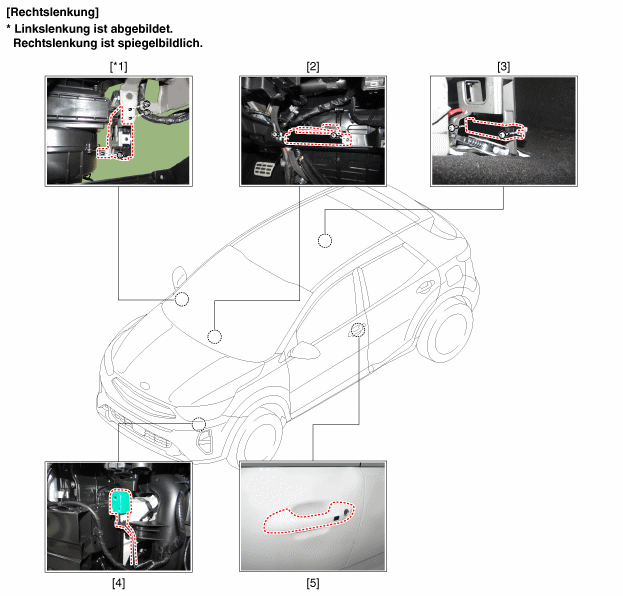
| 1. Smart Key Module (SMK) 2. Interior antenna 1 3. Interior antenna 2 |
4. Buzzer 5. Exterior door handle/door antenna |
Component Overview (2)
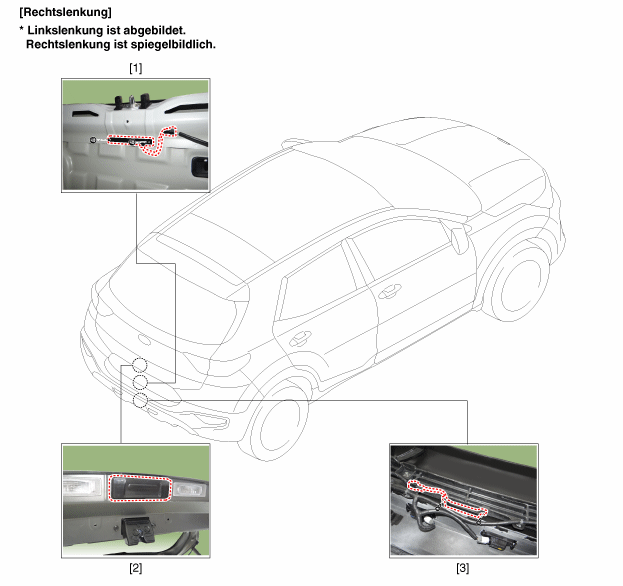
| 1. Tailgate antenna 2. Tailgate opening switch |
3. Bumper Antenna |
Description and Operation
Description
The SMART KEY system allows the user to access and operate the vehicle in a convenient manner. A conventional key or remote control is not required to enter the vehicle.
The user carries the SMART KEY REMOTE, which is not actively used (for example, by pressing an RKE button). The SMART KEY system is triggered by pressing the button on the interior door handle.
After activation, the vehicle sends a request within a limited area. When the SMART KEY REMOTE receives this request, it automatically sends a response back to the vehicle. The system then decides whether to perform a specific action (unlock, lock...) or remain deactivated.
Communication between the vehicle and the SMART KEY REMOTE takes place again, which is required before any other actions can be performed.
The system includes the following functions:
Passive unlocking of all 4 doors
Passive locking of all 4 doors
Passive Start
Passive access to the tailgate using the tailgate switch on the tailgate
the system supports a maximum of 2 remote controls
Driver-side backup immobilizer antenna built into the SSB for TP authentication (for example, emergency function)
Communication with Engine Management System
Communication with SRX
LF-RF communication
passive unlocking
The system allows the user to enter the vehicle (for example, to unlock it) without using the SMART KEY REMOTE.
passive locking
The system allows the user to lock the vehicle by pressing the button on the door handle with the SMART KEY REMOTE.
START button
The system allows the user to switch between each mode (Off, Accessory, Ignition). It also allows the engine to be started and stopped without using the SMART KEY REMOTE. Refer to the engine start button system specifications.
LIMP HOME function
In addition, the system has a so-called "emergency function". The user can control all vehicle functions when the key presses the start/stop button.
Smart Key Control Unit (SMK ECU)
The SMK ECU controls all functions related to passive unlocking, passive locking and passive engine start operation authorization.
It reads inputs (door handle button, start/stop button (SSB), PARK position switch), controls outputs (for example, exterior and interior antennas), and communicates via CAN as well as via the single-wire interface with other vehicle equipment.
The SMK ECU generates a communication request to the SMART KEY REMOTE as an encrypted and modulated 125 kHz signal at the inductive antenna outputs and receives the SMART KEY REMOTE response via the external RF receiver.
The main functional blocks of the SMK ECU are:
power supply
Flash Memory Microcontroller
SRX single-wire interface
EMS single-wire interface
basic level
LF antenna amplifier/driver
CAN Communication with BCM
The LF antenna amplifier/driver generates a sinusoidal carrier signal at 125 kHz, which is sent to the various antennas.
SMART KEY REMOTE CONTROL
The system supports up to 2 SMART KEY REMOTES.
Main functions of the SMART KEY REMOTE:
Passive function: receives the LF request and automatically sends an RF response.
Conventional RKE function with up to 3 buttons pressed.
Transponder function with a discharged battery or with disrupted communication.
antennas
LF transmitting antennas:
Inductive antennas in and on the vehicle are used to generate, under control of the SMK ECU antenna driver, a magnetic field at 125 kHz (or 134.2 kHz), which carries the SMART KEY request.
Three antennas cover the exterior of the vehicle: the two antennas in the door handles (driver side and passenger side) cover the area around the doors; the antenna in the rear bumper covers the area around the luggage compartment or tailgate.
Up to three antennas cover the vehicle interior and the luggage compartment or tailgate area: two in the cabin and one in the luggage compartment.
Bidirectional immobilizer antenna (for Limp Home function):
The backup immobilizer antenna is used for transmitting and receiving data: it radiates a magnetic field (125 to 135 kHz request) and receives the field strength (transponder response).
Receiver
The response from the SMART KEY FOB is received via the RF receiver.
door handle
Front door handles of the two doors (driver door/front passenger door) with transmitting LF antenna, sending 125 kHz signals. The front door handles also have a button.
button
The button on the door handle serves as a trigger and is intended to indicate the operator's intention to unlock or lock the vehicle.
The buttons are installed on the front doors and are integrated into the door handles.
Another button is attached to the luggage compartment lid or tailgate.
HOW IT WORKS
passive functions
The system allows the user to enter the vehicle without using the SMART KEY REMOTE (for example, by pressing the RKE button). It is sufficient for a valid SMART KEY REMOTE to be within a specified and limited area relative to the vehicle. The system is designed so that the SMART KEY REMOTE can be used in the areas defined below to capture and authenticate.
operating range
The SMART KEY REMOTE receives and interprets the request sent by the vehicle. The vehicle transmits through external antennas within free space of at least 0.7 m, measured around the external antennas built into the door handles. Refer to the illustration below. The access zone for the luggage compartment or rear door is also at least 0.7 m from the antenna location.
The SMART KEY REMOTE receives and interprets the request sent by the vehicle. The vehicle transmits through external antennas within free space of at least 0.7 m, measured around the external antennas built into the door handles. Refer to the illustration below.
Passive Access (Passive Start)
If the door handle button is pressed when all doors are locked, this indicates the operator's intention to enter the vehicle and triggers system unlock.
Passive Lock (Exit)
When the button on the door handles is pressed, one of the following conditions is met:
At least one door is open and the two_passes timer is not running, or
The two_passes timer is running and one of the buttons (other than front left) is pressed.
This indicates the operator's intention to lock the vehicle and thus releases the system lock.
Passive Rear Door Warning (Sedan Only)
With the luggage compartment door closed, the SMK ECU uses a suitable search strategy to avoid a luggage compartment door warning with the remote located outside the vehicle. The SMK will search the luggage compartment for the SMART KEY REMOTE. When an active SMART KEY REMOTE is found in the luggage compartment, the SMK activates the external buzzer (to be confirmed) to inform the user that the luggage compartment was found with a remote inside.
The SMK sends a rear door open command to the BCM to reopen the luggage compartment if the reopen bit of the connection line (BK) is set. In this function, an "active" SMART KEY REMOTE means any SMART KEY REMOTE belonging to the vehicle, even if it is OFF.
Smart Key Warning 1
Preconditions:
All terminals are OFF and at least one door is open or not locked. Checked by the SMK every 100 ms as long as CAN/LIN is active.
Case:
The state of at least one door handle changes from unlocked to locked.
SMK actions:
IF REMOTE ENTRY IS NOT ACTIVE
The SMK searches for remotes inside the vehicle. The same LF strategy should be used as for the ID Off warning (registration only, no authentication).
WHEN THE REMOTE IS NOT ACTIVE
SMK search for an active remote
If no remote or transponder is found, no action is required.
If an active remote or active transponder is found, the SMK unlocks the vehicle by sending a key unlock message over CAN with the remote number.
If an active remote is found, the SMK unlocks the vehicle by sending a CAN/LIN key unlock message with the remote number.
Smart Key Warning 2
Preconditions:
All terminals are OFF, and any door (including the luggage compartment door) is open, and there is no REMOTE ENTRY and no lock state (checked by the SMK regularly every 100 ms while CAN/LIN is active).
Vehicle actions:
Closing the last door or luggage compartment with the buttons locked or during locking.
SMK actions:
Within the first 500 ms after the doors are closed, if all doors are locked:
IF REMOTE ENTRY IS NOT ACTIVE
The SMK searches for remotes inside the vehicle.
The same LV strategy as for the ID Off warning must be used (registration only, no authentication).
WHEN THE REMOTE IS NOT ACTIVE
SMK search for an active remote
If no remote is found, no action is required.
If an active remote or active transponder is found, the SMK sends an unlock command over CAN and activates the external buzzer warning.
If an active remote is found, the SMK sends an unlock command over CAN/LIN and activates the external buzzer.
Smart Key Door Lock Warning
Door Lock Warning 1
When the ACC or IGN terminal status is on, all doors are closed, and the user actuates the SMK latch, the search is started from outside the vehicle on the trigger side.
If no active remote is found, no further action is required. If, on the other hand, an active remote is found, the warning buzzer sounds.
If "b_Trunk Option == On" and "b_Trunk LockUnlockOption == On" are satisfied, the lock alarm treats the rear door as a door, and the luggage compartment lock/unlock switch functions as a door unlock switch.
Door Lock Warning 2
When the clamp status is off and not all doors are closed, and the user actuates the SMK latch, the search is started from outside the vehicle on the trigger side.
If no active remote is found, no further action is required. If, on the other hand, an active remote is found, the warning buzzer sounds.
If "b_Trunk Option == On" and "b_Trunk LockUnlockOption == On" are satisfied, the lock alarm treats the rear door as a door, and the luggage compartment lock/unlock switch functions as a door unlock switch.
Door Lock Warning 3
When the clamp status is off, ATWS is considered disarmed, and all doors are closed, and the user actuates the SMK lock, the search is started inside the vehicle.
If no active remote is found, the SMK lock search is started. If, on the other hand, an active remote is found, the warning buzzer sounds.
If "b_Trunk Option == On" and "b_Trunk LockUnlockOption == On" are satisfied, the lock alarm treats the rear door as a door, and the luggage compartment lock/unlock switch functions as a door unlock switch.
Smart Key Light Warning
When the clamp status is ACC or IGN and vehicle speed is below 3 km/h, a periodic search (every 3 s) is performed inside the vehicle to verify that the active remote is still in the vehicle.
If a valid remote control is not found, a warning is issued. Conversely, if a valid remote control is found, no warning is issued.
security functions (backup in case of emergency)
If the SMART KEY REMOTE battery is discharged or faulty, the following functions are available:
Unlocking/locking the doors or luggage compartment (or rear door depending on vehicle configuration): Using the mechanical key
User Information Functions
Warning ID OFF.
Preconditions:
(ACC or IGNITION 1) & (any door or luggage compartment door open)
Case:
The last opened door will be closed.
SMK measures:
SMK searches for the SMART KEY REMOTE inside the vehicle.
If a valid SMART KEY remote is not found, SMK activates the external buzzer and sends the ID OUT warning via CAN (external and internal audible signal).
If the door is closed while connected to terminals and an effective remote control is opened and closed again, SMK re-enables authentication and stops the warning. When terminal is connected to ACC, SMK turns on the immobilizer indicator light.
Detecting low remote control battery voltage
A specific strategy is used to detect low battery voltage. Battery voltage measurement and low voltage detection are integrated in the remote control. Battery voltage is measured when a button on the remote control is pressed or when an LF measurement command is received.
Programming Description
This section describes programming of the SMK and remote controls.
Programming the SMK and remote controls requires connection to the diagnostic tester.
Programming mode
The SMK controls all programming procedures in all modes.
Before starting service programming, the valid remote control and the vehicle secret code (also called PIN code) must be known.
Teach-in mode
This mode is used by dealers to install the SMK and/or a key set, replace or register additional keys for an existing system. This means a specific PIN code is already programmed in the system. The PIN code is fixed for the life of the vehicle, so the same PIN code must be used in this mode. Otherwise, programming will not work.
Teach-in mode procedure (step by step)
Task: Key programming procedure at a service station.
Initial condition:
SMK replacement: SMK is not programmed, smart key and remote are already programmed with the same PIN code.
Programming additional or new keys: SMK is already programmed with the same PIN code.
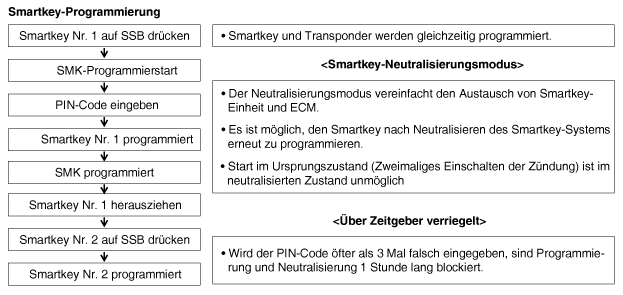
Starting after replacement and installation (start in unprogrammed state)
After replacement with a new smart key unit or remote key, proceed as follows.
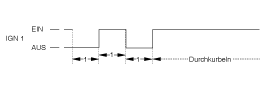
To start in unprogrammed state:
All related parts are unprogrammed (smart key, ECM).
Depress the brake pedal in P or N range
Press the start button once with the unprogrammed smart key.
Test yourself
A quick Kia Stonic quiz: every answer comes with an explanation and a link to the manual page.