Audio System Head Unit
In this manual: Audio System Head Unit
15steps
~90min
4/5difficulty
Done 0 of 15
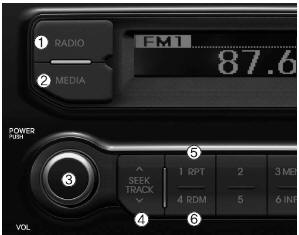
 : Switches between
FM/AM modes : Switches modes
between USB, iPod and AUX Power/Volume Knob
- Power Knob: Turns the power on/off
- Volume Knob: Adjusts the volume
 /
 : Searches radio
station frequencies and files : Repeat
 : Random
 : Scans files
or automatically stores radio station frequencies.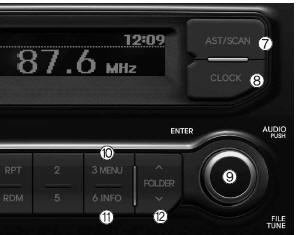
 : Displays and sets the
current time Tuning Knob
- Radio Mode: Changes the frequency when turned left/right
- USB, iPod Mode: Searches files when turned left/right. ❈ When the desired track is displayed, press the knob to play it.
- Moves the cursor through all selection menus and selects a menu
 : MENU
In iPod mode, moves to the root folder through the search category : INFO
USB, iPod Mode: Displays information about the current file /
 : Searches and moves
between folders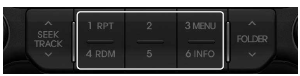
 ~

(Station Preset Programming)
In radio mode, stores and recalls frequencies (presets)
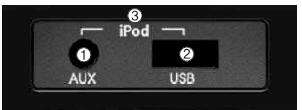
- AUX Jack: Jack for connecting an external device
- USB Port: Port for connecting a USB device
- iPod Port: Port for connecting an iPod device
❈ To play from an iPod, always use the vehicle's iPod cable.
Test yourself
A quick Kia Rio YB quiz: every answer comes with an explanation and a link to the manual page.
Was this page helpful?