Audio System Head Unit
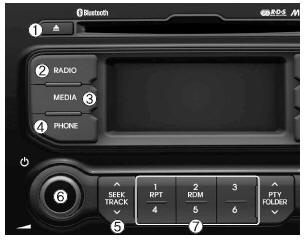
 (EJECT)
- Ejects the CD.

- Switches between FM and AM bands.
- Each time this key is pressed, the mode changes in the following order: FM1 ➟ FM2 ➟ FMA ➟ AM ➟ AMA
❈ In Setup>Display mode, the radio pop-up screen is displayed when [Mode Pop-up] is turned on. When the mode pop-up screen is displayed, use the TUNE knob or
keys ~

, to select the desired mode.

- Changes modes to CD, USB MP3, iPod, BT MP3 and AUX.
- Each time this key is pressed, the mode changes in the following order: CD, USB, iPod, AUX, My Music, BT Audio.
❈ In Setup>Display mode, the radio pop-up screen is displayed when [Mode Pop-up] is turned on. When the mode pop-up screen is displayed, use theTUNE knob or
keys ~

, to select the desired mode.

- Opens the phone screen.
❈ If no phone is connected, the connection screen is displayed.
 ,

- Radio mode: Automatically searches for radio stations.
- CD, USB, iPod, My Music modes
- Short press (less than 0.8 seconds): Moves to the next or previous track (file)
- Press and hold (more than 0.8 seconds): Seeks or fast-forwards the current track
- PWR/VOL knob
- Power Knob: Turns power on/off when the knob is pressed
 Volume Knob: Adjusts volume when the knob is turned left/right
 ~

(Preset)
- Radio mode: Stores frequencies (channels) or recalls stored frequencies (channels)
- CD, USB, iPod, My Music modes
 :Repeat
 :Random
- On the Radio, Media, Setup and Menu pop-up screens, select the menu number
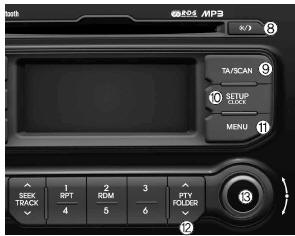
 /

- Each time this key is pressed (less than 0.8 seconds), the screen changes in the following order: Screen on ➟ Screen off
❈ Audio system operation is maintained; only the screen is turned off. When the screen is off, press any key to turn the screen back on.

- Radio mode
- Press and hold (more than 0.8 seconds): Lets you listen to each radio station for 5 seconds
- CD, USB, iPod modes
- Press and hold (more than 0.8 seconds): Lets you listen to each track (file) for 10 seconds
❈ Press the key again ,
to continue listening to the current track (file).

- Short press (less than 0.8 seconds): Goes to the setup modes Display, Sound, Clock, Phone and System
- Press and hold (more than 0.8 seconds): Goes to the time setting screen (Time setting)

Displays the menu for the current mode. ,

- MP3, CD, USB modes: Folder search
- iPod mode: Goes to the parent folder
- FM: RDS program type search
- Knob
 TUNE
- Radio mode: Changes the frequency when the knob is turned left/right
- CD, USB, iPod modes: Searches tracks (files) when the knob is turned left/right. ❈ When the desired track is displayed, press the knob to play it.
- Moves the cursor through all selection menus and selects a menu
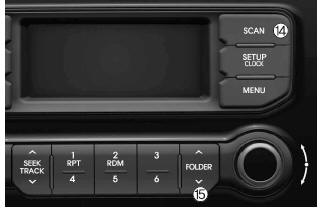

- Radio mode
- Short press (less than 0.8 seconds): Lets you listen to each radio station for 5 seconds
- Press and hold (more than 0.8 seconds): Lets you listen to each radio station stored on the preset keys
 ~
 for 5 seconds.
❈ Press the key again to continue listening to the currently selected radio station.
- CD, USB, iPod modes
- Short press (less than 0.8 seconds): Lets you listen to each track (file) for 10 seconds ❈ Press the key again
 ,
to continue listening to the current track (file).
 ,

- MP3, CD, USB modes: Folder Search
- iPod mode: Goes to the parent folder
Test yourself
A quick Kia Rio YB quiz: every answer comes with an explanation and a link to the manual page.